









Quick Verdict
Quadratic excels by letting you write and execute Python, SQL, and JavaScript directly within spreadsheet cells, bridging the gap between coding and spreadsheet analysis. Its AI-powered charts provide quick visualization without manual configuration. The main limitation is its paid pricing model, which may deter casual users or those with tight budgets. This tool is best for data analysts, engineers, or technical marketers who need to combine code execution with spreadsheet flexibility for complex data workflows.
Quadratic – AI Python Sql Spreadsheet
- Category: Spreadsheets
- Pricing: Paid
- Best for: Data analysts blending code and spreadsheets
Background Check on Quadratic – AI Python Sql Spreadsheet
We ran a background check on x.com to verify its safety, security posture, hosting infrastructure, and web history. Here are the results as of April 19, 2026.
✓ Cookies, Cross Origin Resource Sharing (CORS), Redirection, Strict Transport Security (HSTS), X-Content-Type-Options, X-Frame-Options
✗ Content Security Policy (CSP), Subresource Integrity
Source: Mozilla Observatory report
What is Quadratic?
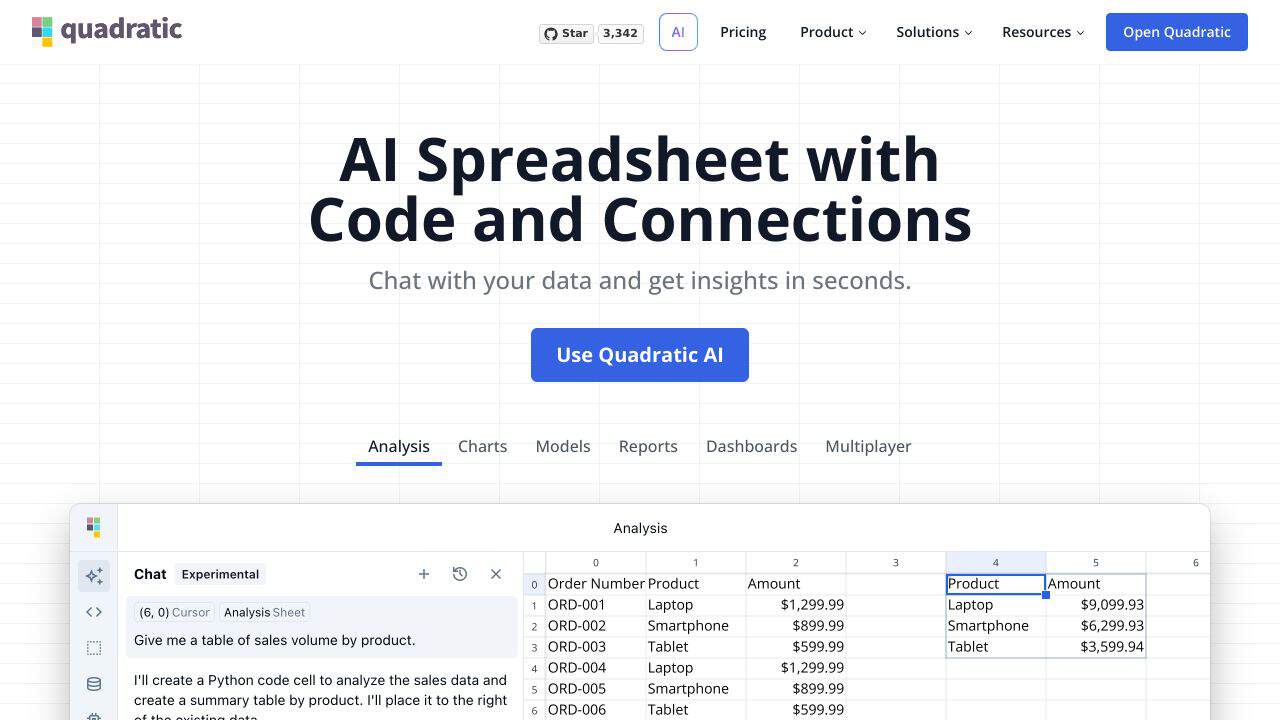
Quadraticis not your average spreadsheet tool. It’s a modern, AI-powered spreadsheet that lets you chat with your data, write and execute code, and connect directly to databases – all in one place. Think of it as Excel on steroids, but with the added superpowers of Python, SQL, and AI. Whether you’re a data scientist, business analyst, or just someone who loves crunching numbers, Quadratic makes data analysis faster, smarter, and more intuitive. With features like AI-generated charts and natural language queries, it’s designed to give you insights at the speed of thought.
Quadratic Features
- Code Cells: Write and execute Python, SQL, and JavaScript directly in your spreadsheet.
- AI-Powered Charts: Create and edit charts using simple natural language commands.
- Database Connections: Connect to PostgreSQL, MySQL, and Snowflake for real-time data queries.
- Infinite Canvas: Work with large datasets on a flexible, scrollable workspace.
- Real-Time Collaboration: Multiple users can edit and view spreadsheets simultaneously.
- AI Autocomplete: GPT-4.0-powered suggestions for faster coding and fewer errors.
- Security First: SOC 2 (Type II) and HIPAA compliant, ensuring your data stays private and secure.
Quadratic Use Cases
- Data Scientists: Use Quadratic for advanced data analysis, machine learning, and scientific computing. For example, analyze large datasets and visualize trends with AI-generated charts.
- Business Analysts: Simplify database queries and create interactive dashboards to present insights to stakeholders.
- Software Engineers: Integrate code directly into your data workflows, making it easier to automate tasks and build custom functions.
- Startups: Use Quadratic to analyze customer data and create data-driven pitches for investors.
- Non-Profits: Manage and analyze large datasets for reporting and decision-making.
How Quadratic – AI Python Sql Spreadsheet Compares to Alternatives
When choosing a spreadsheet AI tool, consider whether you need code execution capabilities, AI-powered features like chart generation, and pricing flexibility. Quadratic stands out for its direct integration of programming languages, while alternatives may focus on specific niches like finance automation or Google Sheets enhancement.
| Tool | Best For | Pricing |
|---|---|---|
| Quadratic – AI Python Sql Spreadsheet | Users who need to execute Python, SQL, and JavaScript directly within spreadsheet cells for data analysis. | Paid pricing, no free tier mentioned. |
| SheetXAI – AI for Google Sheets | Teams already using Google Sheets who want AI enhancements without switching platforms. | Paid, likely subscription-based. |
| Numra – AI Finance Automation Platform | Finance professionals needing specialized automation for financial data and reporting. | Contact for pricing, enterprise-focused. |
| Gigasheet – AI Data Analysis Platform | Users handling large datasets who prefer a freemium model with AI analysis features. | Freemium, with paid upgrades available. |
Best For
- Data analysts who need to run SQL queries and Python scripts within a spreadsheet interface.
- Technical marketers building custom data models that require JavaScript execution for web data.
- Engineers prototyping data pipelines with visual spreadsheet outputs and AI-generated charts.
- Teams combining code review with spreadsheet collaboration for data validation projects.
Not Ideal For
- Casual users who only need basic spreadsheet functions without coding requirements.
- Budget-conscious solopreneurs who require a free tool for simple data entry tasks.
- Finance teams that need specialized platforms like FloQast for financial close processes.
Getting Started
Start by creating a simple Python cell to import a dataset, then use an AI-powered chart to visualize it quickly. This helps you test both code execution and visualization features in one workflow. Avoid complex SQL queries initially, focus on understanding how cells interact with your code outputs.
Key Limitations to Consider
- Paid pricing only, with no free tier mentioned, which limits accessibility for small budgets.
- Requires coding knowledge in Python, SQL, or JavaScript to fully utilize its core features.
- May have a steeper learning curve compared to traditional spreadsheets due to code integration.
- AI-powered charts might lack customization options for advanced design needs.
- Not ideal for users who only need basic spreadsheet functions without programming capabilities.
Related Workflows and Tool Pairings
Quadratic fits into workflows where data analysis requires both coding and spreadsheet visualization. For example, you might pull raw data from a database using SQL in Quadratic, process it with Python scripts, then create AI-powered charts for reports. This tool pairs well with data storage platforms like cloud databases for importing datasets, and collaboration tools that support code sharing and version control. It also complements BI tools for deeper analytics, as Quadratic can handle the initial data transformation and chart generation before exporting to more specialized platforms. For marketers, it works alongside CRM systems to analyze customer data directly within a programmable spreadsheet environment.
Related tools to explore: 2Slash – Universal AI Assistant, AI Excel Bot – Formula Generator Tool, Arcwise – AI Spreadsheet Task Streamlining, Bettersheets – Formula Generator Tool, Booke AI – AI Bookkeeping Automation Accuracy, Botsheets – AI Chat Automation, Spreadsheets tools
Conclusion
Quadraticis a strong option for anyone who works with data. It combines the simplicity of spreadsheets with the power of coding and AI, making complex data tasks more accessible and efficient. Whether you’re creating charts, querying databases, or writing code, Quadratic streamlines the process so you can focus on what matters most – your insights. With its solid features, real-time collaboration, and high-quality security, it’s a tool that’s built for the future of data analysis. Ready to enhances? Quadratic has got you covered.
Pricing
Quadratic – AI Python Sql Spreadsheet is apaid AI spreadsheets tool. Visit the official website for current pricing plans and details.
Frequently Asked Questions
What is Quadratic – AI Python Sql Spreadsheet?
Quadratic is not your average spreadsheet tool. It’s a modern, AI-powered spreadsheet that lets you chat with your data, write and execute code, and connect directly to databases – all in one place. Think of it as Excel on steroids, but with the added.
Is Quadratic – AI Python Sql Spreadsheet free?
No, Quadratic – AI Python Sql Spreadsheet is a paid tool. Visit the official website for current pricing and plan options.
What are the best Quadratic – AI Python Sql Spreadsheet alternatives?
There are many AI spreadsheets tools available. Browse our AI Spreadsheets tools directory to compare features, pricing, and reviews for the best alternatives.
Last verified: April 2026
Explore more: Browse all AI Spreadsheets tools
