












Quick Verdict
OneTake.AI (Nuro.Video) delivers fast AI-powered video editing that can significantly reduce production time for business content. Its main limitation is the paid pricing model, which may deter individual creators on tight budgets. Marketing teams, corporate communications departments, and businesses needing to produce polished video content regularly should consider this tool for its efficiency gains.
OneTake.AI (Nuro.Video) – Rapid Video Editing
- Category: Video Editing
- Pricing: Paid
- Best for: Teams and businesses needing AI video editing capabilities
Background Check on OneTake.AI (Nuro.Video) – Rapid Video Editing
We ran a background check on onetake.AI to verify its safety, security posture, hosting infrastructure, and web history. Here are the results as of April 19, 2026.
- Server: cloudflare
- Hosting: CLOUDFLARESPECTRUM Cloudflare London, LLC, US (US)
- SSL Certificate: WE1 (certificate age: 43 days)
- Domain Age: ~3 years (1,181 days)
Source: urlscan.io scan report
✓ Cookies, Cross Origin Resource Sharing (CORS), Redirection, Strict Transport Security (HSTS), X-Frame-Options
✗ Content Security Policy (CSP), Subresource Integrity, X-Content-Type-Options
Source: Mozilla Observatory report
What is it?
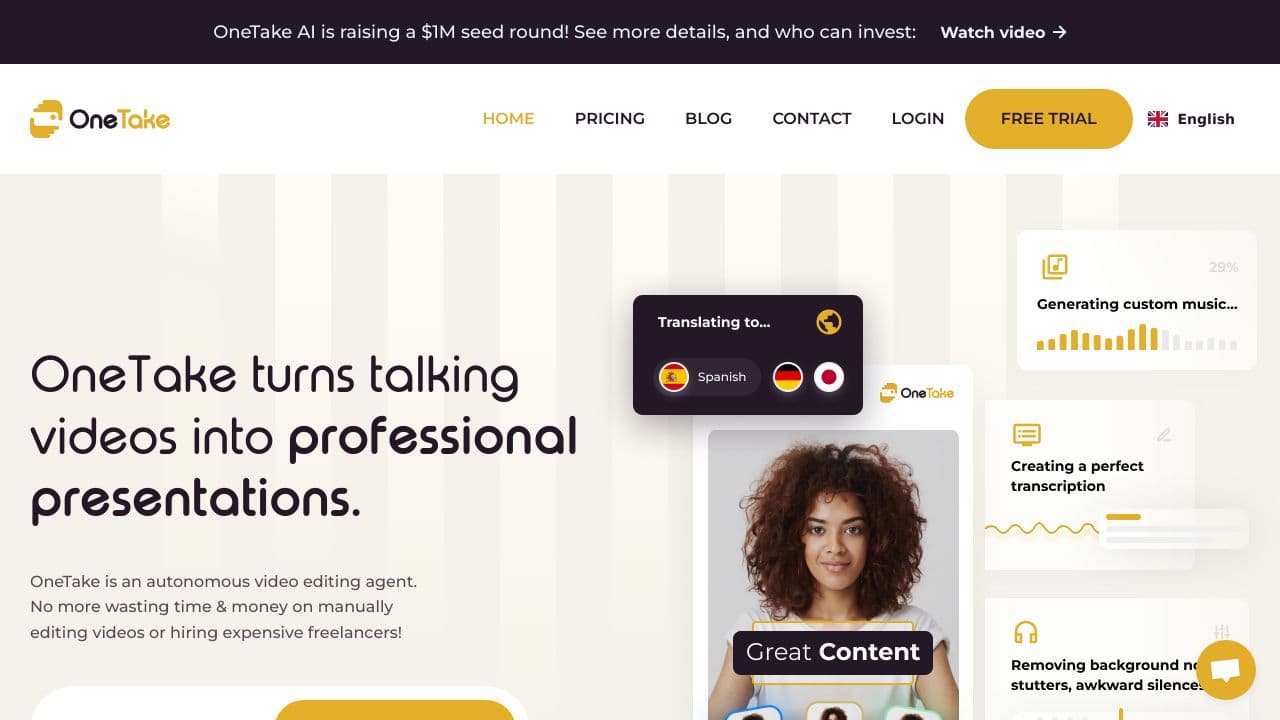
OneTake.AI is an AI-driven video editor designed to enhance your content by automatically eliminating fillers, ambient sounds, and other disruptions that may irritate your viewers. The edited videos can include AI-generated voiceovers in different languages, which even adjust your lip movements. Additionally, an automated transcription feature assists students in keeping up with courses. Join us as we delve into OneTake.AI to discover how you can achieve professionally edited and translated videos with minimal effort.
Key Features
This innovative platform offers several impressive functionalities that streamline the video editing process.
Magic Button
The core feature of OneTake.AI is the Magic Button, which refines your uploaded videos within moments. This enhancement process removes distracting background noises, ensuring your audience remAIns focused on the content.
Content Translation
Not only does OneTake.AI translate your videos, but it also provides an AI-generated voiceover that aligns your mouth movements with the spoken text. A live transcription is displayed in an adjacent box for easier comprehension.
Automated Transcription
This tool generates transcriptions effortlessly, making it easier for viewers to follow along, especially in multilingual settings. The transcription feature is invaluable for those who struggle with audio clarity due to mumbling or noisy environments.
Browser-Based Accessibility
OneTake.AI functions entirely in your web browser, allowing users to access it easily on any device equipped with internet capabilities.
FAQ
How does OneTake.AI handle video editing?
After uploading your footage, you simply click the Magic Button, which processes and improves your video by removing unwanted elements and enhancing audio quality.
Can I use OneTake.AI for multiple languages?
Yes, the platform offers support for various languages, allowing for real-time translations and AI voiceovers that match your original speech.
What types of users benefit from OneTake.AI?
This tool is particularly beneficial for course creators, vloggers, and anyone producing video content who requires high-quality edits without the usual time and resource investment.
Are there any integrations available with OneTake.AI?
Currently, there are no third-party integrations or API options available for OneTake.AI, which may limit some advanced users in their workflow.
How OneTake.AI (Nuro.Video) – Rapid Video Editing Compares to Alternatives
When evaluating AI Video Editing tools, key factors include the balance between automation and control, output quality for professional use, and integration with existing workflows. For business users, team collaboration features and consistent branding capabilities often outweigh raw speed alone.
| Tool | Best For | Pricing |
|---|---|---|
| OneTake.AI (Nuro.Video) | Teams and businesses needing rapid AI video editing with professional polish for marketing and communications. | Paid subscription model with business pricing. |
| Pykaso | Creating viral social media content with AI-generated influencer personas and trending formats. | Paid plans focused on social media creation. |
| FraimeBot | Generating memes quickly with AI templates for casual social media engagement. | Free platform for basic meme generation. |
| ByteCap | Adding accurate captions and subtitles to existing videos using AI transcription. | Paid tool specializing in accessibility features. |
Best For
- Marketing teams producing weekly product demo videos for social media
- Corporate training departments creating consistent instructional video content
- Small agencies handling multiple client video projects with tight deadlines
- Business communicators needing to turn presentations into polished video summaries
Not Ideal For
- Individual hobbyists editing personal vacation videos on a zero budget
- Film studios requiring frame-by-frame manual control over cinematic edits
- Users needing advanced 3D animation or complex visual effects capabilities
Getting Started
Begin by uploading a raw video clip and using the AI’s automatic scene detection to see how it segments your content. Then experiment with the one-click style presets to understand how the AI applies different editing templates. This will give you immediate insight into the time savings possible before diving into manual adjustments.
Key Limitations to Consider
- Limited customization options for users who need granular control over every editing parameter
- Paid pricing structure excludes budget-conscious individual creators and hobbyists
- May struggle with highly specialized video formats or unconventional aspect ratios
- AI editing decisions might not always match specific brand guidelines without manual tweaking
- Requires clear source footage quality for optimal AI processing and output results
Related Workflows and Tool Pairings
OneTake.AI fits naturally into business video production pipelines where speed and consistency matter. After scriptwriting and filming, this tool quickly assembles rough cuts that human editors can refine, saving hours on initial assembly. It pairs well with cloud storage platforms for team asset management, allowing multiple users to access and process footage. For final polish, complement it with dedicated color grading tools to enhance visual consistency across projects. Audio enhancement software also works well alongside OneTake.AI, since the tool focuses primarily on visual editing while clean audio remains crucial for professional results. The workflow typically moves from raw footage through AI-assisted assembly to human review and final export.
Related tools to explore: 2short.AI – Shorts Clip Generator, AI Face Swap – Seamless Face Swapper, AI Facefy – Face Swap Creator, AI Storyboard Generator – AI Easy Storyboard Creation, AISaver – Video Downloader & Face Swap, AIvideocreator.com – Video Template Generator, Video Editing tools
Conclusion
OneTake.AI stands out as an efficient AI video editing solution that simplifies the editing process for educators, content creators, and vloggers. While it offers many advantages, such as automatic transcriptions and translations, those seeking extensive third-party integrations may find it lacking. It caters well to users wanting quick and professional video enhancements but may not suit those requiring a more integrated toolset.
Pricing
OneTake.AI (Nuro.Video) – Rapid Video Editing is apaid AI video editing tool. Visit the official website for current pricing plans and details.
Last verified: April 2026
Explore more: Browse all AI Video Editing tools
