













Quick Verdict
Notta delivers reliable voice-to-text transcription with solid accuracy for business use cases. The paid pricing model means no free tier for casual users. Teams and businesses needing consistent transcription for meetings, interviews, or documentation should consider this tool.
Notta – Voice-to-Text Transcription
- Category: Transcriber
- Pricing: Paid
- Best for: Teams and businesses needing AI transcriber capabilities
What is it?
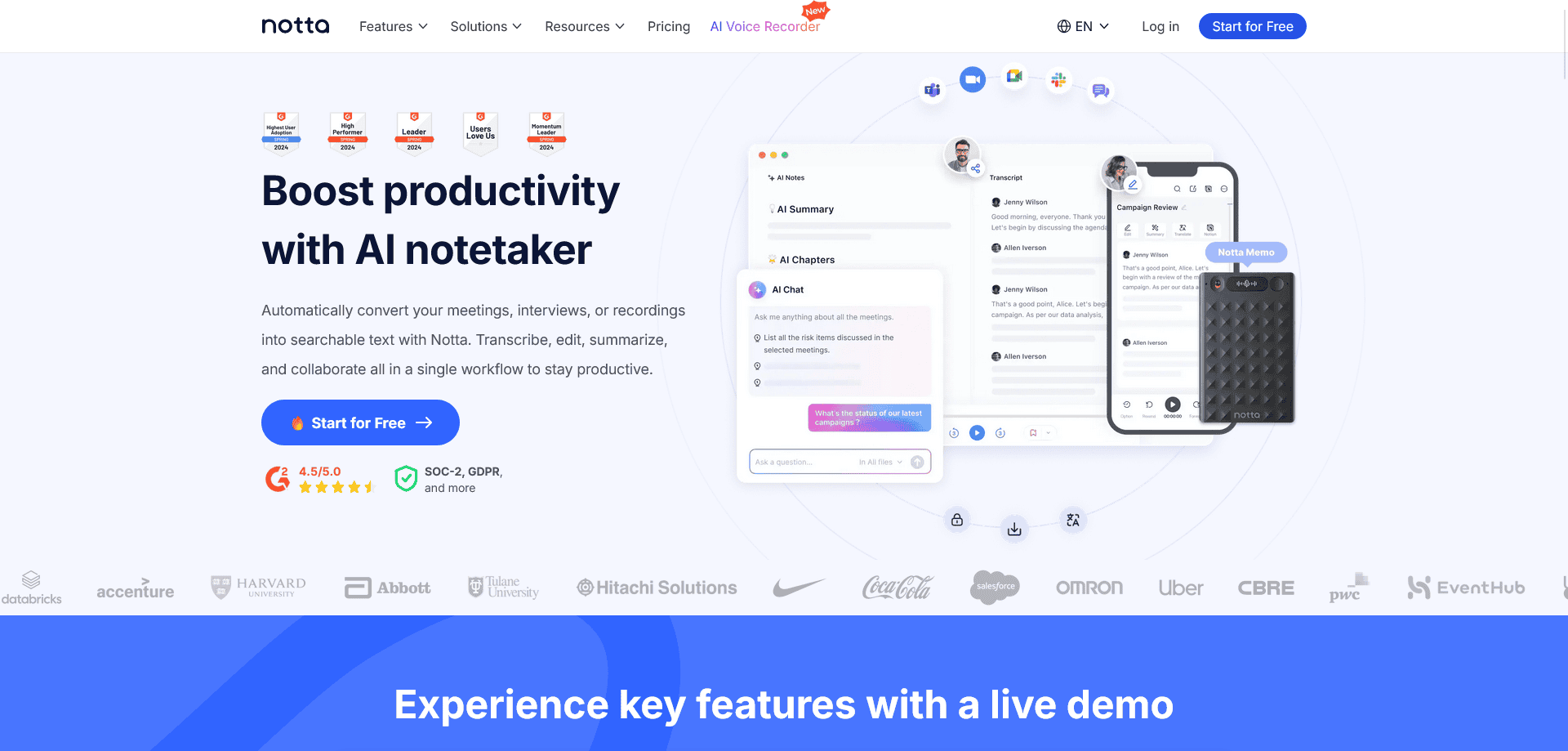
Notta is an advanced AI-driven transcription service that converts audio to text, supporting an impressive 104 languages. It delivers highly accurate and easily readable transcriptions in real time, simplifying various tasks from meeting notes to translating videos.
Notta Features
This remarkable service comes with a variety of features designed for efficiency and ease of use.
Real-Time Transcription
Notta allows users to transcribe audio in real time, enhancing productivity and ensuring that important conversations or meetings are captured accurately without delay.
Support for Multiple Platforms
You can effortlessly import links from platforms like Google Meet, Zoom, or Microsoft Teams, along with files from Google Drive and Dropbox, streamlining the transcription process from various sources.
Editing and Polishing Tools
Notta provides comprehensive editing capabilities, allowing you to refine your transcriptions by inserting images, making adjustments, and adding annotations directly within the platform.
AI-Powered Summaries
The service utilizes modern AI to generate summaries of your transcripts, helping you easily identify key points and action items, facilitating quick reviews.
Notta FAQ
How accurate is Notta’s transcription?
Notta boasts a high level of accuracy in its transcriptions, making it suitable for professional use in various languages, ensuring reliability in capturing spoken content.
Can I share my transcripts with others?
Yes, Notta enables easy sharing of your transcripts within a team, supporting hierarchy management and permission settings to mAIntAIn privacy and security.
Is it compatible with different devices?
Absolutely, Notta’s interface is designed to be user-friendly and works well across different devices, ensuring versatility whether you’re using a computer, tablet, or mobile.
What security measures does Notta have in place?
Notta implements several security protocols including reporting features and IP address restrictions, ensuring that your data remAIns protected and accessible only to authorized users.
How Notta – Voice-to-Text Transcription Compares to Alternatives
When choosing a transcription tool, key factors include accuracy, pricing structure, and specialized features for your use case. Notta competes in a crowded market where alternatives may offer free tiers, video-specific features, or industry specialization.
| Tool | Best For | Pricing |
|---|---|---|
| Notta – Voice-to-Text Transcription | Teams and businesses needing general purpose AI transcription for meetings and voice recordings. | Paid subscription with no free tier. |
| ByteCap – AI Video Caption Tool | Users specifically needing captions for video content rather than general transcription. | Paid tool focused on video. |
| MeetGeek – AI Meeting Productivity Tool | Teams wanting free meeting transcription with additional productivity features. | Free tier available. |
| Deciphr Ai – AI Podcast Transformation Platform | Podcasters needing transcription plus content repurposing features for audio shows. | Paid platform for podcasters. |
Best For
- Business teams transcribing weekly team meetings and strategy sessions
- Researchers conducting interviews that need accurate text documentation
- Content creators converting recorded voice notes into written articles
- Legal or consulting firms documenting client conversations and agreements
Not Ideal For
- Individual users needing occasional free transcription for personal use
- Medical professionals requiring HIPAA-compliant medical transcription
- Video creators needing automatic caption generation for YouTube content
Getting Started
Start by testing Notta with your most common recording format to check accuracy. Record a 5-minute sample meeting or interview, then review the transcription for any industry-specific terminology errors. This will help you understand if you need to adjust your speaking clarity or recording quality.
Key Limitations to Consider
- No free tier available for testing or casual use before committing to paid plan
- Limited information about specialized features for specific industries like legal or medical
- May not include video captioning features that some competitors offer
- Pricing details not specified in available information, requiring direct inquiry
Related Workflows and Tool Pairings
Notta fits naturally into content creation and documentation workflows. After transcription, users typically move text into document editors for polishing or project management tools for action items. This tool pairs well with meeting recording software that captures high-quality audio. It also complements note-taking applications where transcribed text becomes searchable archives. For teams, the output often feeds into collaboration platforms where multiple stakeholders review and annotate transcripts. Consider pairing Notta with audio enhancement tools if recording quality varies, and with translation services if working with multilingual content.
Related tools to explore: AI Phone – AI Call Efficiency Transcription, AI Transcription by Riverside – AI Multilingual Transcription Tool, AI.OpenSubtitles.com – Subtitle Generation Tool, AIrCaption – Audio to Caption Tool, Abridge – AI Medical Documentation Streamlining, Alphy – AI Transcription Assistant, Transcriber tools
Conclusion
In summary, Notta serves as an efficient tool for anyone needing quick and accurate transcription services, ideal for professionals in meetings, educators, writers, and more. However, it may not be suitable for those who prefer manual transcription processes or have limited internet access.
Pricing
Notta – Voice-to-Text Transcription is apaid AI transcriber tool. Visit the official website for current pricing plans and details.
Last verified: April 2026
Explore more: Browse all AI Transcriber tools
