












Quick Verdict
Databox excels at providing AI-powered business analytics through spreadsheet interfaces, making data analysis accessible for teams without deep technical expertise. Its paid-only pricing model means no free tier for testing or small-scale use. This tool is best for established teams and businesses that need to integrate AI capabilities directly into their spreadsheet workflows for business intelligence.
Databox – AI Business Analytics Tool
- Category: Spreadsheets, Workflows
- Pricing: Paid
- Best for: Teams and businesses needing AI spreadsheets capabilities
Background Check on Databox – AI Business Analytics Tool
We ran a background check on databox.com to verify its safety, security posture, hosting infrastructure, and web history. Here are the results as of April 19, 2026.
✓ Cross Origin Resource Sharing (CORS), Redirection
✗ Content Security Policy (CSP), Strict Transport Security (HSTS), Subresource Integrity, X-Content-Type-Options
Source: Mozilla Observatory report
What is it?
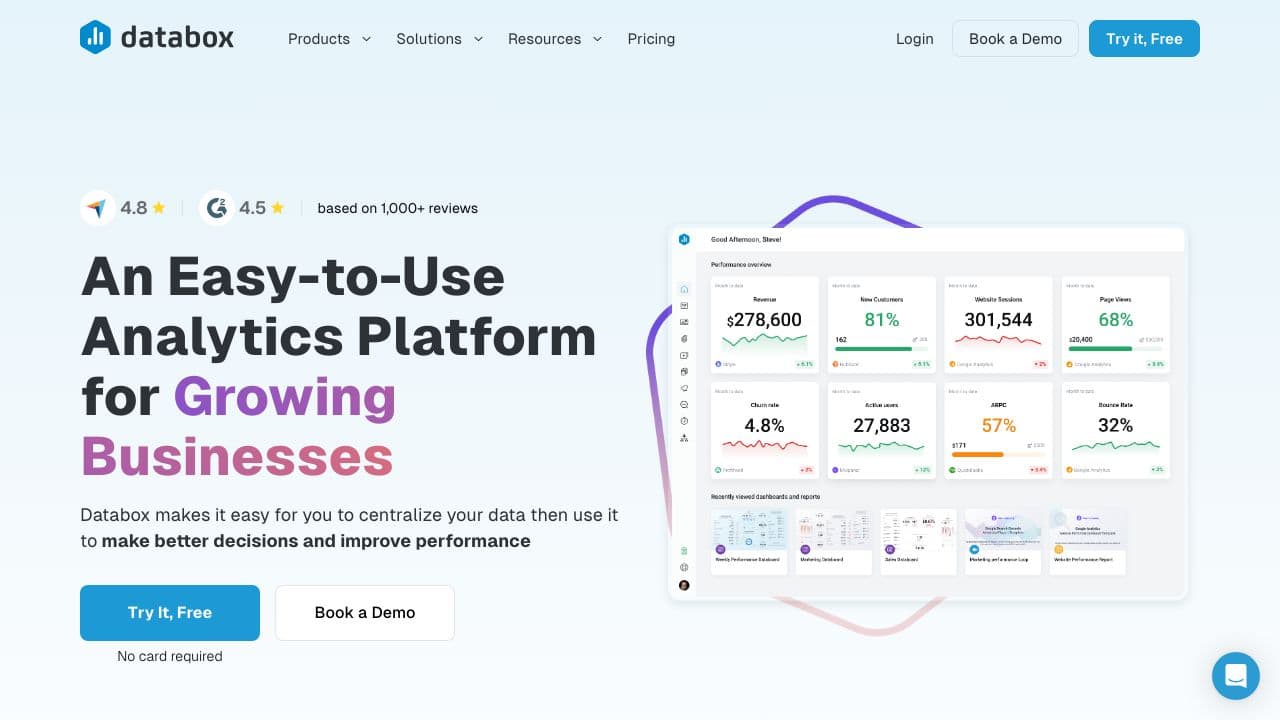
This product is a solid business analytics platform AImed at streamlining performance oversight for companies of all sizes. It provides a variety of tools to gather, illustrate, and interpret essential performance metrics (KPIs) across diverse fields such as marketing, sales, customer service, and finance.
Features
Here are some of the key features that make this platform a valuable asset for businesses seeking enhanced analytic capabilities.
Comprehensive Metric Tracking
The platform helps users to monitor thousands of metrics from a multitude of tools, featuring pre-built popular metrics and widely used visualizations. It smoothly integrates different data sources into one easy-to-read dashboard, presenting a complete overview of performance.
Customizable Dashboards
Users can effortlessly craft and modify dashboards without requiring any coding or design experience. The intuitive interface allows for personalized views of key metrics that meet the unique needs of each team.
Automated Reporting
This solution greatly simplifies the generation of automated reports, along with goal monitoring and performance benchmarks. This automation ensures that teams have timely access to insightful analytics without manual input.
Extensive Use Cases
This platform is suitable for a variety of applications, including marketing analysis, sales performance assessments, customer support evaluation, eCommerce insights, project management, financial reporting, software development, and SaaS performance evaluation. It offers over 200 pre-defined report templates catered to these areas.
FAQ
How easy is it to set up and use?
The platform is designed for quick setup and strAIghtforward usage, with no coding skills required for dashboard creation or metric calculations. This accessibility allows anyone on the team to utilize the tools effectively.
What integrations are available?
It supports over 100 data sources and tools, offering extensive integration options along with API functionality for those seeking more customized solutions and data connections.
Can it be accessed on multiple devices?
Yes, the platform is compatible with various devices, providing applications for desktops, mobile devices (iOS & Android), and TVs. This ensures users can access data and dashboards from virtually anywhere.
Is there a community support system?
The platform fosters a community of professionals and agency partners, with access to a library of more than 200 proven pre-built reports and templates. This community aspect enhances ongoing development and the sharing of best practices in data visualization and analytics.
How Databox – AI Business Analytics Tool Compares to Alternatives
When evaluating AI spreadsheet tools, key factors include pricing transparency, integration capabilities with existing platforms, and the specific AI features offered for data analysis. Marketers should consider whether a tool focuses on general analytics, financial automation, or specialized functions like data cleaning.
| Tool | Best For | Pricing |
|---|---|---|
| Databox – AI Business Analytics Tool | Teams needing AI-powered business analytics integrated with spreadsheet workflows | Paid plans only, no free tier |
| SheetXAI – AI for Google Sheets | Google Sheets users wanting AI enhancements within their existing spreadsheet environment | Paid subscription model |
| Numra – AI Finance Automation Platform | Finance teams automating financial reporting and analysis workflows | Contact for custom pricing |
| Gigasheet – AI Data Analysis Platform | Users needing to analyze large datasets with AI-powered data cleaning tools | Freemium model with paid upgrades |
Best For
- Marketing teams tracking campaign performance across multiple channels
- Business analysts creating automated dashboards from spreadsheet data
- Operations managers monitoring KPIs with AI-generated insights
- Small to medium businesses consolidating data from various sources
Not Ideal For
- Solo entrepreneurs needing a completely free analytics solution
- Teams requiring real-time financial close automation
- Users who only need basic spreadsheet functions without AI
Getting Started
Begin by connecting your most critical data sources, such as Google Analytics or CRM platforms, to Databox. Create a simple dashboard with 3-4 key metrics you track regularly, then use the AI features to identify trends or anomalies in that data. This approach helps you understand the tool’s value before building complex workflows.
Key Limitations to Consider
- No free tier available for testing or small projects before committing financially
- Primarily focused on business analytics rather than financial automation or accounting
- May require data cleaning in external tools before optimal analysis in Databox
- Learning curve for teams unfamiliar with AI-powered spreadsheet concepts
Related Workflows and Tool Pairings
Databox fits into business intelligence workflows where teams need to transform raw data into actionable insights. It typically sits between data collection tools and presentation platforms. Complementary tool types include data visualization software for creating polished reports, CRM platforms for customer data integration, and project management tools for tracking action items from insights. The AI capabilities help automate the analysis phase, allowing teams to focus on decision-making rather than manual data processing. For comprehensive workflows, users often pair Databox with collaboration tools to share findings across departments.
Related tools to explore: 2Slash – Universal AI Assistant, AI Excel Bot – Formula Generator Tool, Arcwise – AI Spreadsheet Task Streamlining, Bettersheets – Formula Generator Tool, Booke AI – AI Bookkeeping Automation Accuracy, Botsheets – AI Chat Automation, Spreadsheets tools, Workflows tools
Conclusion
In summary, this business analytics platform is an ideal solution for teams looking to streamline their performance tracking and analysis. It suits organizations that require an easy-to-use, versatile analytics system, although it may be less ideal for those needing highly specialized or advanced customizations. Overall, its broad applicability and user-friendly design make it a valuable tool for enhancing business performance transparency.
Pricing
Databox – AI Business Analytics Tool is apaid AI spreadsheets tool. Visit the official website for current pricing plans and details.
Last verified: April 2026
Explore more: Browse all AI Spreadsheets tools | Browse all AI Workflows tools
