













Quick Verdict
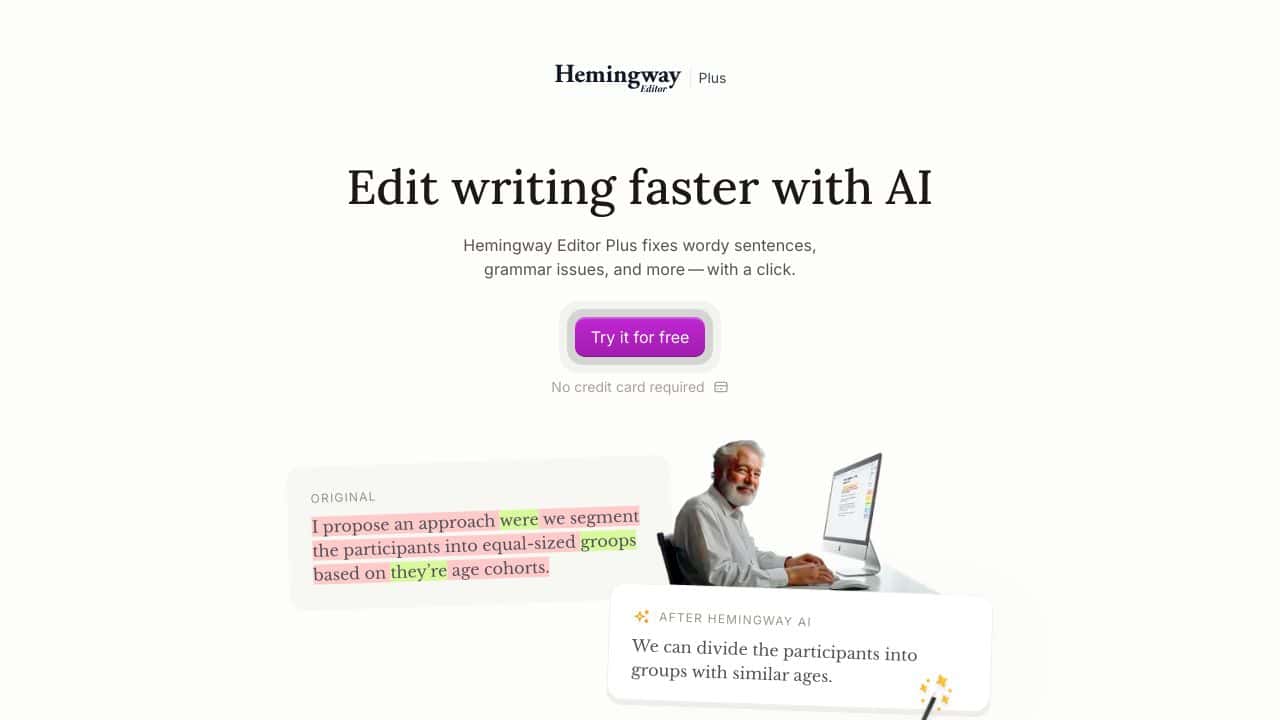
Hemingway Editor excels at making writing clearer and more direct by instantly fixing wordy sentences, weak phrases, and passive voice. It goes beyond basic grammar checks to improve readability with a single click. However, it focuses primarily on style and clarity rather than comprehensive content generation or deep structural editing. Marketers, bloggers, and business writers who need to polish their prose quickly should consider this tool.
Hemingway Editor – AI Writing Clarity Style
- Category: Education, Writing Generators
- Pricing: Freemium
- Best for: Writers seeking clear and bold prose
Background Check on Hemingway Editor – AI Writing Clarity Style
We ran a background check on hemingwayapp.com to verify its safety, security posture, hosting infrastructure, and web history. Here are the results as of April 19, 2026.
✓ Cross Origin Resource Sharing (CORS), Redirection
✗ Content Security Policy (CSP), Strict Transport Security (HSTS), X-Content-Type-Options, X-Frame-Options
Source: Mozilla Observatory report
What is Hemingway Editor Plus?
Hemingway Editor Plusis an AI-powered writing assistant designed to simplify and clarify your writing in seconds. It’s like having a personal editor who fixes grammar issues, trims wordy sentences, and polishes your tone – all with a single click. Trusted by millions of writers, this tool helps you write like yourself, not a robot. Whether you’re crafting an emAIl, a blog post, or a novel, Hemingway Editor Plus ensures your writing is bold, clear, and impactful.
Hemingway Editor Plus Features
- Instant Sentence Rewriting: Fixes wordy sentences, weak phrases, and passive voice with a click.
- Advanced Grammar Tool: Goes beyond spellchecks to tackle even the toughest grammar issues.
- Style Customization: Apply one of eight styles (e.g., confident, formal, friendly) to match your tone.
- Document Review & Feedback: Acts as your personal reviewer, offering detAIled insights and suggestions.
- Synonym Suggestions: Finds context-relevant synonyms to avoid repetition and enhance variety.
- Privacy Assurance: Your data is never sold, used for advertising, or shared with third parties.
- Writer’s Block AId: Inspires new ways to rephrase text and overcome creative hurdles.
- Readability Scoring: Analyzes your text to ensure it’s clear and easy to understand.
Hemingway Editor Plus Use Cases
- Content Creators: Simplify blog posts, articles, and social media captions for better engagement.
- Students & Academics: Refine essays, research papers, and reports for clarity and professionalism.
- Business Professionals: Polish emAIls, presentations, and proposals to make a strong impression.
- Authors: Edit manuscripts to ensure readability and mAIntAIn a consistent tone.
- Language Learners: Improve English writing skills with instant feedback and suggestions.
- Non-Profits: Draft compelling grant proposals and donor communications with ease.
How Hemingway Editor – AI Writing Clarity Style Compares to Alternatives
When choosing writing clarity tools, consider whether you need instant sentence-level fixes, comprehensive grammar checking, or content generation capabilities. Hemingway Editor stands out for its laser focus on making text more direct and readable.
| Tool | Best For | Pricing |
|---|---|---|
| Hemingway Editor – AI Writing Clarity Style | Instant sentence rewriting to fix wordiness, weak phrases, and passive voice. | Freemium model with basic free version. |
| PathwiseAI – AI Cover Letter Generator | Generating tailored cover letters and job application documents automatically. | Freemium with premium features. |
| Utobo – Create, Teach, & Sell Online Courses | Building and monetizing complete online course platforms with teaching tools. | Paid subscription required. |
| Digest AI – Revolutionary Philippine Legal Research Assistant | Legal research and document analysis specifically for Philippine law contexts. | Freemium model available. |
Best For
- Bloggers and content marketers polishing articles for better readability.
- Business professionals simplifying complex reports or proposals.
- Students improving essay clarity and academic writing style.
- Non-native English speakers making their writing more direct.
Not Ideal For
- Users needing full content generation from scratch.
- Technical writers requiring specialized terminology preservation.
- Creative writers seeking stylistic flourishes and poetic language.
Getting Started
Paste a paragraph of your existing writing into the editor. Click the highlight buttons to see wordy sentences, passive voice, and weak phrases. Use the instant rewrite suggestions for the most problematic sentences first, then review the overall readability score improvement.
Key Limitations to Consider
- Does not generate new content or expand on ideas, only refines existing text.
- May oversimplify complex technical or academic writing that requires specific terminology.
- Limited to sentence-level edits rather than paragraph or document structure analysis.
- Free version has basic features compared to more advanced writing suites.
Related Workflows and Tool Pairings
Hemingway Editor works best as a polishing tool in the final stages of a writing workflow. Start with a research tool to gather information and an outline generator to structure your content. Write your first draft in a word processor or note taking app, then paste it into Hemingway for clarity improvements. After using Hemingway, pair it with a proofreading tool for final grammar and spelling checks, and a plagiarism checker if publishing professionally. This creates a complete workflow from research to polished publication ready text.
Related tools to explore: 100DaysOfAI – DAIly AI Lessons, 3DFY – AI 3D Model Creator, AI Detector – AI Generated Content Detection, AI Experiments – AI Experiment Platform, AI LMS by Coursebox – AI Education Course Creator, AI Quiz Generator – AI Interactive Course Creator, Education tools, Writing Generators tools
Conclusion
Hemingway Editor Plusis more than just a grammar checker – it’s a writing partner that helps you communicate clearly and effectively. With features like instant sentence rewriting, tone matching, and style customization, it’s a strong option for anyone who writes. Whether you’re a student, professional, or creative writer, this tool saves time, enhances clarity, and ensures your writing sounds like you. Ready to elevate your writing? Try Hemingway Editor Plus today and experience the difference.
Pricing
Hemingway Editor – AI Writing Clarity Style offers afreemium plan with optional paid upgrades. Get started for free and upgrade as needed.
Frequently Asked Questions
What is Hemingway Editor – AI Writing Clarity Style?
Hemingway Editor Plus is an AI-powered writing assistant designed to simplify and clarify your writing in seconds. It’s like having a personal editor who fixes grammar issues, trims wordy sentences, and polishes your tone – all with a single click..
Is Hemingway Editor – AI Writing Clarity Style free?
Hemingway Editor – AI Writing Clarity Style offers a free plan with limited features. Paid plans are available for additional capabilities.
What are the best Hemingway Editor – AI Writing Clarity Style alternatives?
There are many AI education tools available. Browse our AI Education tools directory to compare features, pricing, and reviews for the best alternatives.
Last verified: April 2026
Explore more: Browse all AI Education tools | Browse all AI Writing Generators tools
