












Quick Verdict
Strut excels as a free, collaborative writing workspace that combines instant note capture with team editing features. Its main limitation is the lack of advanced AI writing generation compared to specialized tools. Marketers and small teams who need a simple platform to brainstorm, organize ideas, and edit content together should consider it, especially if they’re on a tight budget.
Strut – AI Writing Collaboration Editing
- Category: Copywriting, Project Management, Writing Generators
- Pricing: Free
- Best for: Teams collaborating on AI-assisted writing projects
Background Check on Strut – AI Writing Collaboration Editing
We ran a background check on strut.so to verify its safety, security posture, hosting infrastructure, and web history. Here are the results as of April 19, 2026.
✓ Cross Origin Resource Sharing (CORS)
✗ Content Security Policy (CSP), Redirection, Strict Transport Security (HSTS), Subresource Integrity
Source: Mozilla Observatory report
What is Strut?
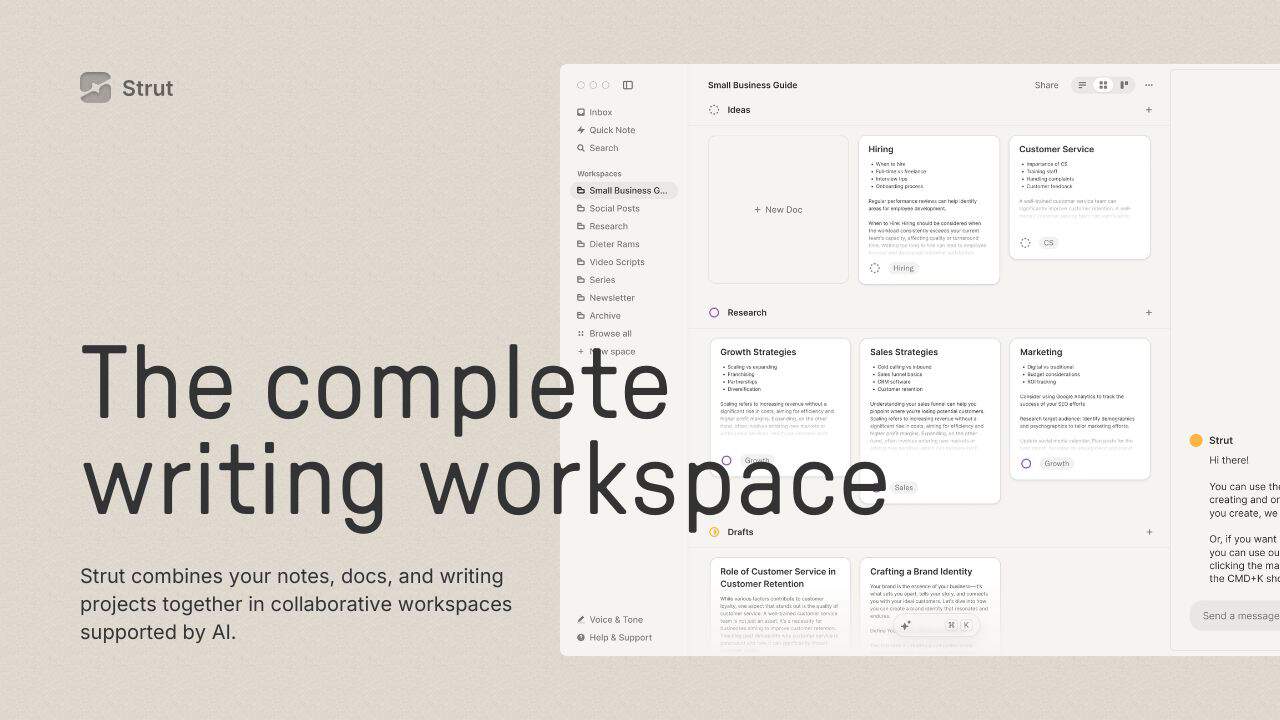
Strutis your ultimate AI-powered writing workspace, designed to bring order to the chaos of your creative process. It’s not just another writing tool – it’s acomplete ecosystem that combines notes, documents, and projects into one collaborative space. Think of it as your always-on AI collaborator, helping you edit, focus, and finish your work with ease. Whether you’re a solo writer or part of a team, Strut keeps your writing moving forward, turning scattered ideas into polished projects.
Strut Features
Here’s what makes Strut stand out:
- Inbox for Instant Capture: Jot down notes and ideas instantly, then organize them later.
- Collaborative Workspaces: Bring your team together in real-time, with shared notes, docs, and projects.
- AI Writing Partner: Get suggestions, edits, research, and inspiration without losing your unique voice.
- Drag & Drop Organization: Move ideas, drafts, and notes effortlessly to keep your workflow smooth.
- Multiple Views: Switch between Kanban, grid, or list views to suit your style.
- Inline Editing & AI Commands: Refine your work directly and use AI-powered commands for smarter workflows.
Strut Use Cases
Strut isn’t just for writers – it’s for anyone who needs to organize and create. Here’s how different people can use it:
- Freelance Writers: Manage multiple client projects while mAIntAIning distinct brand voices.
- Content Marketing Teams: Collaborate in real-time and ensure all messaging stays on-brand.
- Bloggers: Use AI to overcome writer’s block and organize content ideas efficiently.
- Copywriters: Rapidly iterate drafts with inline editing and AI-powered suggestions.
- Academics & Researchers: Organize research notes and drafts into cohesive projects.
- Non-Profits: Streamline grant writing, reports, and team collaboration.
For example, imagine you’re a blogger juggling multiple topics. With Strut, you can capture ideas in the Inbox, organize them into projects, and use AI to refine your drafts – all in one place.
How Strut – AI Writing Collaboration Editing Compares to Alternatives
When choosing a Copywriting tools AI tool, consider whether you need solo ideation, team collaboration, or specialized content generation. Strut stands out for its collaborative editing features, while alternatives focus more on SEO optimization, prompt refinement, or multilingual content creation.
| Tool | Best For | Pricing |
|---|---|---|
| Strut AI Writing Collaboration Editing | Teams needing a free workspace to capture notes, brainstorm ideas, and edit content collaboratively. | Completely free with no tier restrictions. |
| SEO Content AI | Solo creators who need AI generated SEO optimized articles and blog posts. | Freemium model with paid upgrades. |
| Prompt Refine | Users who want to optimize and refine AI prompts for better output quality. | Paid tool with subscription fees. |
| SEOWriteX | Businesses requiring multilingual SEO content creation across different languages. | Free trial available, then paid plans. |
Best For
- Small marketing teams collaborating on content outlines and drafts in real time.
- Solopreneurs who want a free inbox to quickly capture and organize writing ideas.
- Remote teams needing a shared workspace for brainstorming and editing content together.
- Users who prioritize simple note taking and team editing over advanced AI generation.
Not Ideal For
- Users who need AI to generate complete articles or long form content automatically.
- SEO specialists requiring deep keyword optimization and content scoring features.
- Large enterprises needing advanced project management with granular permissions.
Getting Started
Start by using the inbox feature to dump all your random ideas and notes without organizing them. Then, create a collaborative workspace and invite one team member to practice editing a document together. This helps you understand both the instant capture and team editing workflows quickly.
Key Limitations to Consider
- Lacks advanced AI writing generation features found in dedicated content creation tools.
- No built in SEO optimization or keyword research capabilities for content planning.
- Free pricing may mean limited customer support or slower feature updates.
- Project management features are basic compared to specialized team collaboration platforms.
- May not integrate deeply with other marketing or content management systems.
Related Workflows and Tool Pairings
Strut fits well into early stage content creation workflows where ideas are captured, organized, and collaboratively edited before final drafting. Use it alongside dedicated AI writing generators for content creation after brainstorming, then pair with grammar checkers for final polish. For teams, combine it with project management tools to track content calendars and with SEO tools to optimize the finalized content. This creates a pipeline from idea capture in Strut to generation, editing, and optimization in complementary platforms.
Related tools to explore: AI Letter Generator – AI Letter Creator, AI Undetect – Undetectable Writing Assistant, AIBud WP – ContentForge WP, AIBypass – Content Masking Tool, AIurbate – NSFW AI Conversations, Abun – Automated SEO Content Generator, Copywriting tools, Project Management tools
Conclusion
Strutis more than just a writing tool – it’s a strong option for anyone who writes. By combiningAI-powered collaboration, intuitive organization, and smooth editing, it transforms the way you work. Whether you’re a solo creator or part of a team, Strut helps you move from chaos to clarity, ensuring your writing process is as smooth and efficient as possible. Ready to enhances? Strut’s got your back.
Pricing
Strut – AI Writing Collaboration Editing is afree AI copywriting tool. No payment required to get started.
Frequently Asked Questions
What is Strut – AI Writing Collaboration Editing?
Strut is your ultimate AI-powered writing workspace, designed to bring order to the chaos of your creative process. It’s not just another writing tool – it’s a complete ecosystem that combines notes, documents, and projects into one collaborative.
Is Strut – AI Writing Collaboration Editing free?
Yes, Strut – AI Writing Collaboration Editing is completely free to use.
What are the best Strut – AI Writing Collaboration Editing alternatives?
There are many AI copywriting tools available. Browse our AI Copywriting tools directory to compare features, pricing, and reviews for the best alternatives.
Last verified: April 2026
Explore more: Browse all AI Copywriting tools | Browse all AI Project Management tools
