













Quick Verdict
Magicflow excels at providing simple, no-code workflow automation with built-in productivity features like Pomodoro timers and distraction warnings. Its limitation is a lack of enterprise-level integrations compared to some competitors. This tool is best for solopreneurs and small teams who need basic automation with productivity guardrails, not complex enterprise systems.
Magicflow – AI No-code Workflow Automation
- Category: Low-Code/No-Code, Startup Tools, Workflows
- Pricing: Paid
- Best for: Non technical users automating business tasks
Background Check on Magicflow – AI No-code Workflow Automation
We ran a background check on twitter.com to verify its safety, security posture, hosting infrastructure, and web history. Here are the results as of April 19, 2026.
✓ Cookies, Cross Origin Resource Sharing (CORS), Redirection, Strict Transport Security (HSTS), X-Content-Type-Options, X-Frame-Options
✗ Content Security Policy (CSP), Subresource Integrity
Source: Mozilla Observatory report
What is Magicflow?
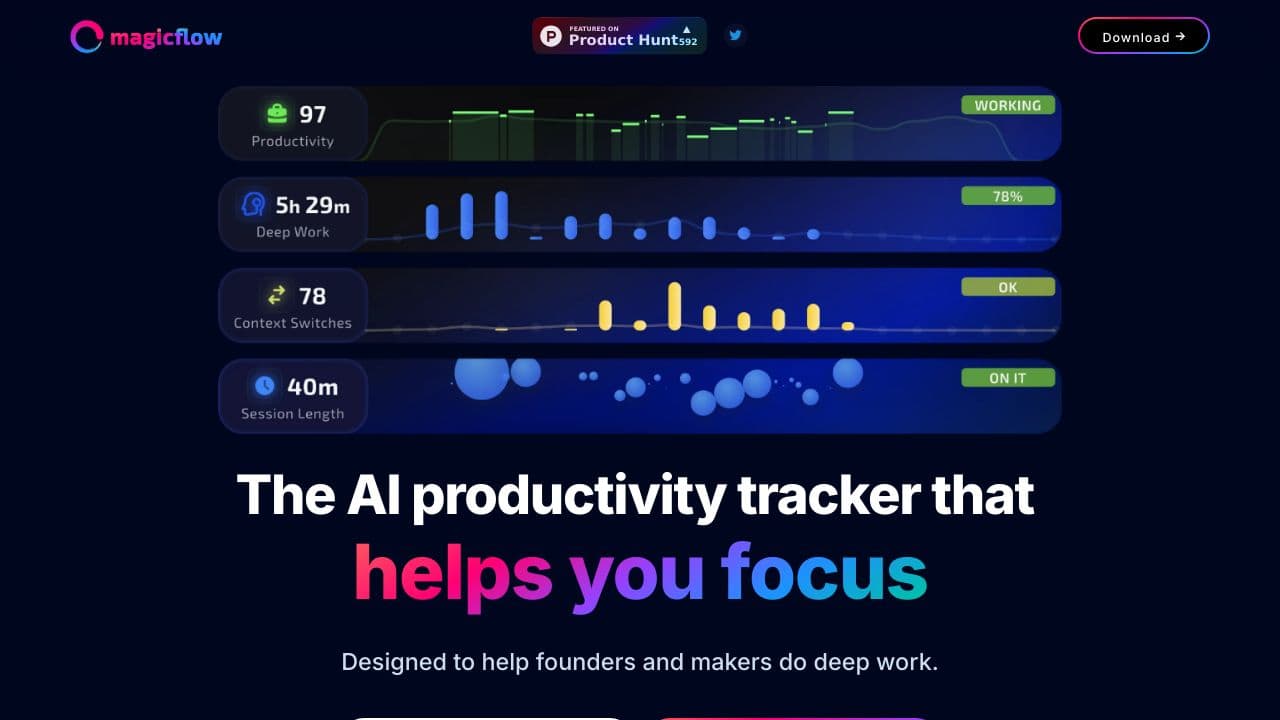
Magicflow is your personal productivity coach, designed to help founders, makers, and professionals dive deep into their work. It’s an AI-powered tool that measures your productivity, tracks your deep work sessions, and identifies what breaks your focus. Think of it as a glowing flow meter that motivates you to stay in the zone. With features like Pomodoro timers and distraction warnings, Magicflow ensures you stay on track to achieve your goals. And the best part? It’s free for 30 days, so you can test-drive it without commitment.
Magicflow Features
- Pomodoro Timers: Break your work into focused intervals with built-in Pomodoro timers.
- Distraction Warnings: Get alerts when you’re veering off track, helping you stay focused.
- Flow Meter: A visual representation of your productivity flow, encouraging you to fill it up.
- Deep Work Tracking: Measure how much time you spend in deep, uninterrupted work.
- Context-Switch Detection: Identify what breaks your focus and learn how to minimize distractions.
- Free Trial: Try it out for 30 days with no strings attached.
Magicflow Use Cases
- Founders: Stay laser-focused on building your startup by tracking deep work sessions and minimizing distractions.
- Makers: Use Magicflow to mAIntAIn flow while working on creative projects or side hustles.
- Students: Boost study sessions with Pomodoro timers and distraction warnings.
- Remote Workers: Stay productive at home by identifying and eliminating productivity killers.
- Example: Imagine you’re working on a tight deadline. Magicflow’s flow meter keeps you motivated, while its distraction warnings ensure you don’t get sidetracked by social media.
How Magicflow – AI No-code Workflow Automation Compares to Alternatives
When choosing a no-code workflow tool, consider your team size, budget, and need for sales or enterprise features. Magicflow focuses on individual productivity, while alternatives may target sales insights or large-scale operations.
| Tool | Best For | Pricing |
|---|---|---|
| Magicflow | Solopreneurs needing simple automation with built-in Pomodoro timers and distraction warnings. | Paid plans only, no free tier. |
| scope.money | Sales teams wanting AI insights into pipeline data and customer interactions. | Freemium model with paid upgrades. |
| Pega Systems | Large enterprises requiring complex, scalable workflow automation with AI. | Contact for custom enterprise pricing. |
| Octoparse AI | Users automating web data extraction and processing through no-code workflows. | Freemium model available. |
Best For
- Freelancers automating repetitive tasks while maintaining focus with timers.
- Small teams setting up basic approval workflows without coding.
- Solopreneurs needing distraction alerts during deep work sessions.
- Startups creating simple customer onboarding sequences quickly.
Not Ideal For
- Large corporations needing deep CRM or ERP integrations.
- Teams requiring advanced sales analytics or forecasting features.
- Developers looking for extensive API access or custom code options.
Getting Started
Begin by mapping one repetitive task you do daily, like sending follow-up emails. Use Magicflow’s visual builder to create a simple trigger-action workflow, then test it with the built-in Pomodoro timer to stay focused during setup. This helps you learn the interface while solving an immediate pain point.
Key Limitations to Consider
- No free tier available, which limits testing before commitment.
- Built-in features focus on productivity, not sales or data analytics.
- May lack advanced integrations with enterprise software like Salesforce.
- Workflow complexity is limited compared to code-based automation tools.
- Pricing is not transparent, requiring contact for details.
Related Workflows and Tool Pairings
Magicflow fits into productivity and task management workflows by handling routine automations between other tools. It pairs well with communication platforms like Slack or email clients to automate notifications and reminders. For data collection, it can work alongside simple form builders or survey tools to trigger follow-up actions. When combined with time tracking software, Magicflow’s Pomodoro features help maintain focus during automated task sequences. This creates a cohesive system where automation reduces busywork while built-in timers protect deep work time.
Related tools to explore: AI App Generator – AI Low-code App Development, AI Enhanced UI Kits – AI-Powered UI Kits, AI-Flow – Model Integration Hub, AI2page.com – One-Page Site Generator, AIcado – No-Code AI Integrator, ActiveBatch – AI No-code Automation Scheduling, Low-Code/No-Code tools, Startup Tools tools
Conclusion
Magicflowis more than just a productivity tool – it’s your personal coach for achieving deep work. With features like Pomodoro timers, distraction warnings, and a glowing flow meter, it’s designed to keep you focused and motivated. Whether you’re a founder, maker, student, or remote worker, Magicflow helps you identify what’s holding you back and pushes you toward your goals. Ready to get real about your productivity? Start your free 30-day trial today and see the difference for yourself.
Pricing
Magicflow – AI No-code Workflow Automation is apaid AI low-code/no-code tool. Visit the official website for current pricing plans and details.
Frequently Asked Questions
What is Magicflow – AI No-code Workflow Automation?
Magicflow is your personal productivity coach, designed to help founders, makers, and professionals dive deep into their work. It’s an AI-powered tool that measures your productivity, tracks your deep work sessions, and identifies what breaks your.
Is Magicflow – AI No-code Workflow Automation free?
No, Magicflow – AI No-code Workflow Automation is a paid tool. Visit the official website for current pricing and plan options.
What are the best Magicflow – AI No-code Workflow Automation alternatives?
There are many AI low-code/no-code tools available. Browse our AI Low-Code/No-Code tools directory to compare features, pricing, and reviews for the best alternatives.
Last verified: April 2026
Explore more: Browse all AI Low-Code/No-Code tools | Browse all AI Startup Tools tools
