















Quick Verdict
PAInnt excels at providing an extensive library of over 2,000 artistic filters for image transformation, from classical art styles to modern cartoons. Its freemium model makes it accessible for casual users, though the tool appears focused primarily on filter application rather than comprehensive editing. Marketers and content creators who need quick, stylized images for social media should consider it, especially if they want to create custom filters using their own reference images.
PAInnt – AI Digital Task Management
- Category: Image Editing, Image Generators, Social Media
- Pricing: Freemium
- Best for: Teams managing complex digital project workflows
Background Check on PAInnt – AI Digital Task Management
We ran a background check on medium.com to verify its safety, security posture, hosting infrastructure, and web history. Here are the results as of April 19, 2026.
✓ Cross Origin Resource Sharing (CORS), Redirection, Referrer Policy, Strict Transport Security (HSTS), Subresource Integrity, X-Content-Type-Options
✗ Content Security Policy (CSP)
Source: Mozilla Observatory report
What is PAInnt?
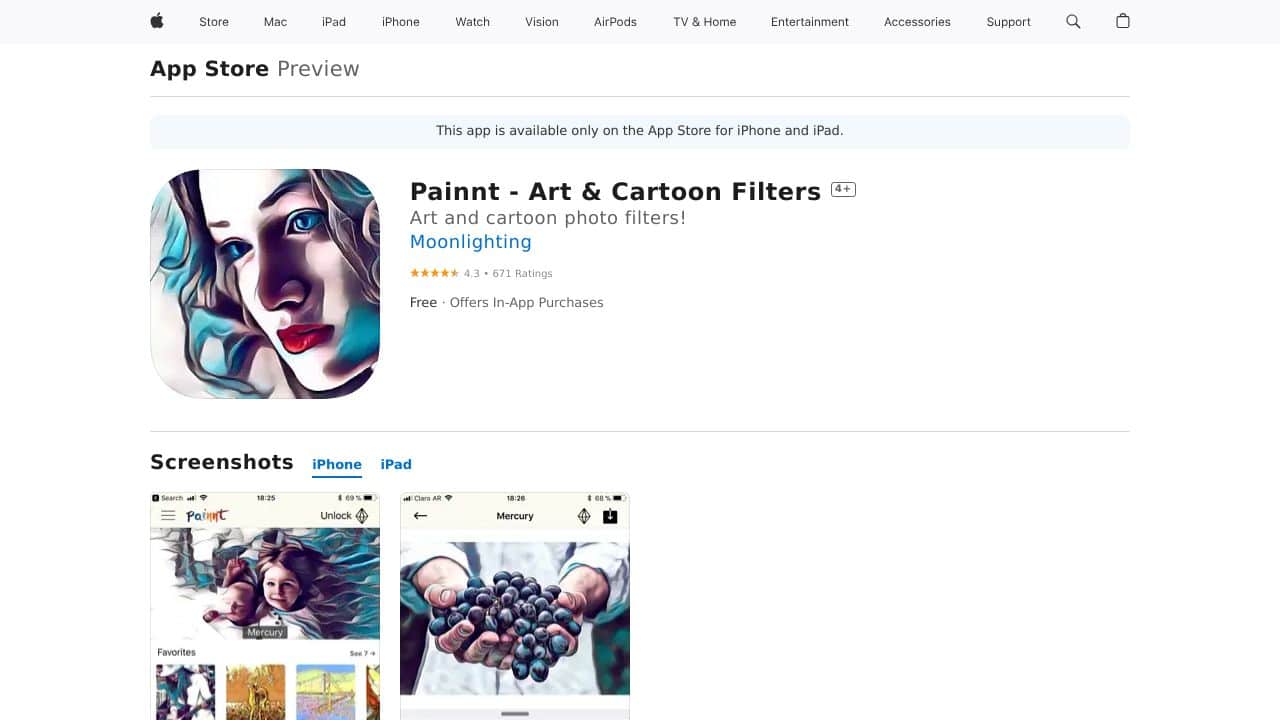
PAInnt is an AI-powered photo editing app that turns your ordinary photos into stunning works of art. With over 2,000+ filters, ranging from classic Van Gogh-style pAIntings to comic book sketches, PAInnt lets you transform your images into masterpieces. Whether you’re an artist, photographer, or just someone who loves playing with photos, PAInnt makes it easy to create professional-looking art in seconds. Plus, it uses AI deep dream technology to generate realistic pAInting effects and cartoon styles, all in one app.
PAInnt Features
- 2,000+ Artistic Filters: From classical art to modern cartoons, PAInnt has a filter for every style.
- Custom Styles: Create your own filters using any image or pAInting as a reference.
- High-Resolution Output: Perfect for printing or sharing online in HD quality.
- Community Sharing: Share your custom filters with other users and explore their creations.
- Voice Commands: Use Siri to get things done hands-free.
- Subscription Options: Unlock premium features like HD processing, custom styles, and watermark removal for as low as $0.99/week.
PAInnt Usecases
- For Artists: Experiment with different art styles and textures to create unique digital pAIntings.
- For Photographers: Turn your photos into gallery-worthy pieces or add a creative twist to your portfolio.
- For Social Media Enthusiasts: Make your Instagram or Facebook posts stand out with eye-catching, artistic edits.
- For Designers: Use PAInnt to add artistic elements to posters, ads, or other commercial projects.
- For Educators: Teach students about digital art and AI technology using PAInnt as a creative tool.
- For Real Estate Agents: Enhance property photos to make listings more visually appealing.
How PAInnt – AI Digital Task Management Compares to Alternatives
When choosing an AI Image Editing tools tool, key factors include the specific editing capabilities needed, pricing structure, and whether the tool specializes in particular outputs like headshots or general filters. PAInnt stands out for its massive filter library and custom style creation, but alternatives may offer different strengths.
| Tool | Best For | Pricing |
|---|---|---|
| PAInnt – AI Digital Task Management | Applying over 2,000 artistic filters and creating custom styles from reference images | Freemium model with free access available |
| Pykaso – Get Your AI Influencer Viral | Generating viral social media content with AI influencer personas | Paid subscription required |
| AirBrush AI Headshots – AI Headshot Enhancement Tool | Enhancing professional headshots with AI retouching and background replacement | Pricing not specified |
| HeadshotGenerator.io – AI Headshot Generator Kit | Creating professional headshots from casual photos using AI generation | Freemium model available |
| Photoroom – AI Photo Editing Platform | Comprehensive AI photo editing with background removal and object manipulation | Freemium model available |
Best For
- Social media managers needing quick artistic filters for visual content
- Content creators who want to apply specific art styles to their images
- Marketers creating branded visuals with custom filter styles
- Artists experimenting with different artistic interpretations of photos
Not Ideal For
- Users needing professional headshot generation or enhancement
- Teams requiring collaborative editing features or version control
- Businesses needing advanced photo manipulation beyond filter application
Getting Started
Begin by uploading a simple, high contrast image to test the filter effects clearly. Explore the classical art filters first to understand the style transformations, then experiment with creating a custom filter using a reference image that represents your desired aesthetic. This approach helps you quickly gauge the tool’s capabilities for your specific needs.
Key Limitations to Consider
- Limited to filter application rather than comprehensive image editing tools
- No information provided about export options or resolution limitations
- Unclear if batch processing is available for multiple images
- May not include advanced features like object removal or background editing
- Custom filter creation likely requires clear reference images for best results
Related Workflows and Tool Pairings
PAInnt fits into content creation workflows where images need quick artistic transformation before publication. After basic editing in a traditional photo editor for cropping and exposure adjustments, PAInnt applies artistic filters to create stylized visuals. These enhanced images then move to social media scheduling tools for posting, or to design platforms for incorporation into larger marketing materials. Complementary tool types include basic photo editors for preliminary adjustments, social media management platforms for content distribution, and graphic design software for integrating filtered images into complete layouts. The tool works best when positioned as a styling step rather than a complete editing solution.
Related tools to explore: 1PX.AI – AI Image Editing Bulk, ACDSee – AI Photo Management, AI Character Generator – AI Storyboard Character Creation, AI Face Swap – Seamless Face Swapper, AI Facefy – Face Swap Creator, AI Filter – Photo Style Transformer, Image Editing tools, Image Generators tools
Conclusion
PAInntis more than just a photo editor – it’s a gateway to creativity. With its vast library of filters, custom style options, and high-resolution output, it’s perfect for anyone looking to turn their photos into art. Whether you’re a professional or just having fun, PAInnt offers endless possibilities to explore. Sure, it has a few quirks like occasional crashes and the need for an internet connection, but its strengths far outweigh the flaws. If you’re ready to unleash your inner artist,PAInnt is the tool to try.
- https://medium.com/advanced-editing-tips-moonlighting?utm_campAIgn=head_tab&utm_medium=header&utm_source=moonlighting_website&utm_content=medium&utm_term=blog
- https://www.instagram.com/moonlighting_io/
- https://twitter.com/Moonlighting_io
- https://es.pinterest.com/moonlighting_io/
- https://www.facebook.com/sharer.php?s=100&p[title]={title}&p[url]=http://moonlighting.io/superphoto-browse-effects?effid={id}%26efftitle={encodetitle}%26effdesc={encodedesc}
Pricing
PAInnt – AI Digital Task Management offers afreemium plan with optional paid upgrades. Get started for free and upgrade as needed.
Frequently Asked Questions
What is PAInnt – AI Digital Task Management?
PAInnt is an AI-powered photo editing app that turns your ordinary photos into stunning works of art. With over 2,000+ filters, ranging from classic Van Gogh-style pAIntings to comic book sketches, PAInnt lets you transform your images into.
Is PAInnt – AI Digital Task Management free?
PAInnt – AI Digital Task Management offers a free plan with limited features. Paid plans are available for additional capabilities.
What are the best PAInnt – AI Digital Task Management alternatives?
There are many AI image editing tools available. Browse our AI Image Editing tools directory to compare features, pricing, and reviews for the best alternatives.
Last verified: April 2026
Explore more: Browse all AI Image Editing tools | Browse all AI Image Generators tools
