












Quick Verdict
Dubs excels at providing AI-powered video dubbing and subtitle generation across 100+ languages, eliminating the need for expensive voice-over artists. One limitation is the lack of transparent pricing, requiring users to contact the company directly. This tool is best for educators, content creators, and businesses needing to localize video content quickly and cost-effectively.
Dubs – AI Video Dubbing Subtitles
- Category: Education, Translator, Video Editing
- Pricing: Contact for Pricing
- Best for: Content creators expanding their global audience
Background Check on Dubs – AI Video Dubbing Subtitles
We ran a background check on www.instagram.com to verify its safety, security posture, hosting infrastructure, and web history. Here are the results as of April 19, 2026.
✓ Cookies, Cross Origin Resource Sharing (CORS), Redirection, Strict Transport Security (HSTS), X-Content-Type-Options, X-Frame-Options
✗ Content Security Policy (CSP), Subresource Integrity
Source: Mozilla Observatory report
What is Dubs?
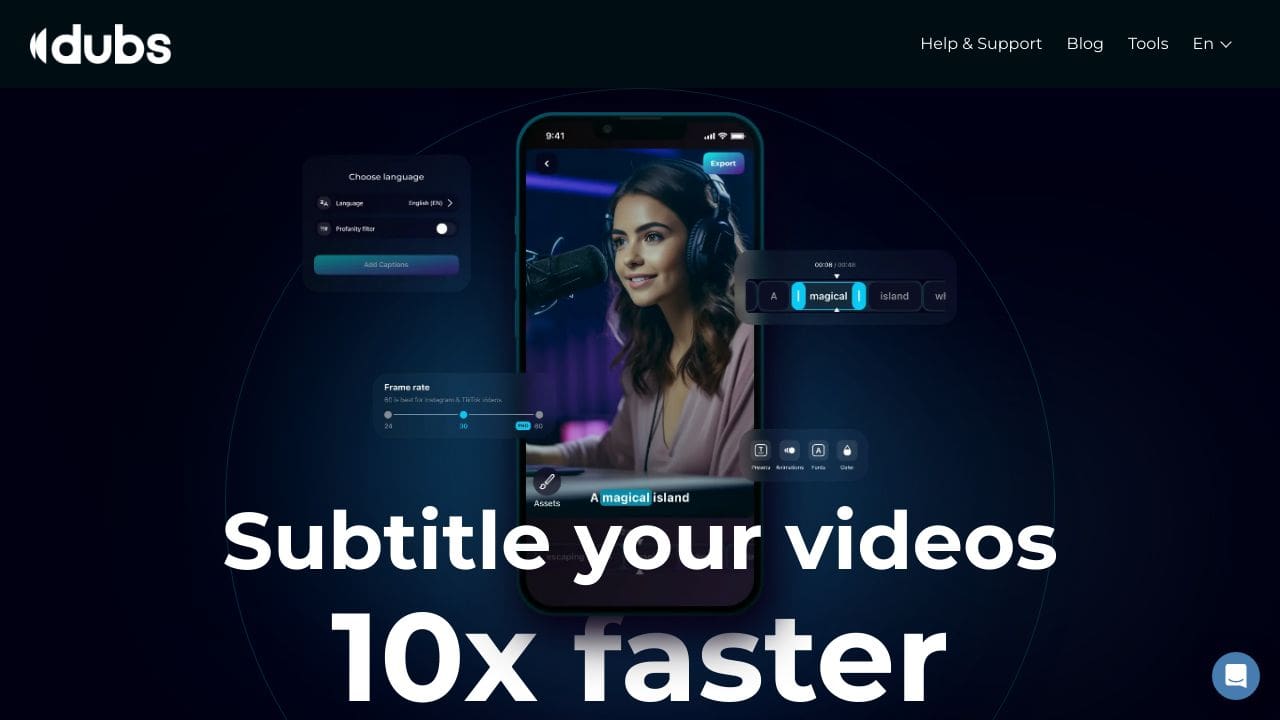
Dubs is an AI-powered tool that makes adding subtitles and dubbing to videos a breeze. Designed for content creators, it uses advanced AI to generate highly accurate subtitles (96%+ accuracy) and dub videos in over 100 languages. Whether you’re a YouTuber, marketer, or educator, Dubs helps you make your videos more engaging and accessible to a global audience. With over 1 million users and 150,000 dAIly active users, it’s a trusted tool for simplifying video content creation.
Dubs Features
- AI Dubbing: Dub videos in 100+ languages without hiring voice-over artists.
- Auto-Subtitle Generator: Create subtitles with 96%+ accuracy using AI speech recognition.
- Customizable Subtitles: Personalize fonts, sizes, colors, and positions to match your style.
- Dynamic Animations: Add eye-catching animations to captions to grab viewers’ attention.
- Teleprompter: Record videos effortlessly with an on-screen teleprompter.
- AI Script Generator: Generate creative scripts for videos in seconds.
- Precision Control: Drag and drop captions on the timeline for perfect timing.
Dubs Use Cases
- Content Creators: Add subtitles and dubs to YouTube videos, TikTok clips, or Instagram reels to boost engagement.
- Digital Marketers: Create multilingual ads or promotional videos to reach a global audience.
- Educators: Make educational videos accessible to non-native speakers with accurate subtitles and dubs.
- Social Media Influencers: Use dynamic animations and captions to make your content stand out.
- Podcasters: Expand your reach by turning audio content into engaging video formats.
- Language Tutors: Create multilingual content to teach languages effectively.
How Dubs – AI Video Dubbing Subtitles Compares to Alternatives
When evaluating AI tools for Education tools and content creation, key factors include language support, ease of use, and pricing transparency. Dubs stands out for its extensive dubbing capabilities, but alternatives may offer different strengths like course creation or legal research.
| Tool | Best For | Pricing |
|---|---|---|
| Dubs – AI Video Dubbing Subtitles | Automatically dubbing videos and generating subtitles in over 100 languages without voice actors. | Contact for pricing, no public plans. |
| PathwiseAI – AI Cover Letter Generator | Creating personalized cover letters for job applications using AI templates. | Freemium model with basic free tier. |
| Utobo – Create, Teach, & Sell Online Courses | Building and monetizing online courses with teaching tools and sales features. | Paid subscription, no free version. |
| Acadle – LMS for Employee and Customer Training | Managing learning programs for employee onboarding and customer education. | Paid plans tailored for organizations. |
Best For
- Educators creating multilingual video lessons for global students.
- Content producers needing fast dubbing for YouTube or social media.
- Businesses localizing training videos for international teams.
- Nonprofits translating awareness campaigns into multiple languages.
Not Ideal For
- Users needing detailed legal or academic research assistance.
- Creators who require advanced video editing beyond dubbing.
- Solo learners looking for free or low-cost subtitle tools.
Getting Started
Begin by uploading a short test video to check the AI’s dubbing accuracy in your target language. Review the auto-generated subtitles for timing and translation errors before finalizing. This helps you understand the tool’s strengths before committing to larger projects.
Key Limitations to Consider
- Pricing is not publicly available, requiring direct contact for quotes.
- May lack nuanced voice emotion control compared to human voice actors.
- Dubbing quality can vary depending on the original audio clarity.
- No built-in video editing features beyond dubbing and subtitles.
- Limited integration with other educational or content platforms.
Related Workflows and Tool Pairings
Dubs fits into video production workflows by handling the localization phase after initial content creation. First, use video editing software to produce your base video. Then, run it through Dubs for dubbing and subtitles. Finally, pair it with a video hosting platform for distribution and a learning management system for educational content. Complementary tool types include video editors for pre-processing, analytics platforms to track viewer engagement across languages, and project management tools to coordinate multilingual projects. This creates an efficient pipeline for global content delivery.
Related tools to explore: 100DaysOfAI – DAIly AI Lessons, 3DFY – AI 3D Model Creator, AI Detector – AI Generated Content Detection, AI Experiments – AI Experiment Platform, AI LMS by Coursebox – AI Education Course Creator, AI Quiz Generator – AI Interactive Course Creator, Education tools, Translator tools
Conclusion
Dubs is a strong option for anyone creating video content. With its AI-powered subtitle generation, multilingual dubbing, and customizable features, it’s designed to save time and enhance creativity. Whether you’re a beginner or a pro, Dubs makes it easy to create videos that resonate with a global audience. Ready to enhances? Give Dubs a try and see the magic for yourself!
Pricing
Dubs – AI Video Dubbing Subtitles uses custom pricing.Contact their sales team for a quote tailored to your needs.
Frequently Asked Questions
What is Dubs – AI Video Dubbing Subtitles?
Dubs is an AI-powered tool that makes adding subtitles and dubbing to videos a breeze. Designed for content creators, it uses advanced AI to generate highly accurate subtitles (96%+ accuracy) and dub videos in over 100 languages. Whether.
Is Dubs – AI Video Dubbing Subtitles free?
Dubs – AI Video Dubbing Subtitles uses custom pricing. Contact their sales team directly for a personalized quote.
What are the best Dubs – AI Video Dubbing Subtitles alternatives?
There are many AI education tools available. Browse our AI Education tools directory to compare features, pricing, and reviews for the best alternatives.
Last verified: April 2026
Explore more: Browse all AI Education tools | Browse all AI Translator tools
