














Quick Verdict
Dezgo excels at free text-to-image generation with detailed results from simple prompts. Its text-to-video feature is in beta, which means it’s experimental and may have limited functionality. Marketers and creators on a tight budget should consider Dezgo for quick visual content creation without cost barriers.
Dezgo – AI Text To Media Creation
- Category: Image Generators, Text To Image, Video Generators
- Pricing: Free
- Best for: Creators needing quick AI images
Background Check on Dezgo – AI Text To Media Creation
We ran a background check on discord.com to verify its safety, security posture, hosting infrastructure, and web history. Here are the results as of April 19, 2026.
✓ Cookies, Cross Origin Resource Sharing (CORS), Redirection, Strict Transport Security (HSTS), X-Content-Type-Options, X-Frame-Options
✗ Content Security Policy (CSP), Subresource Integrity
Source: Mozilla Observatory report
What is Dezgo?
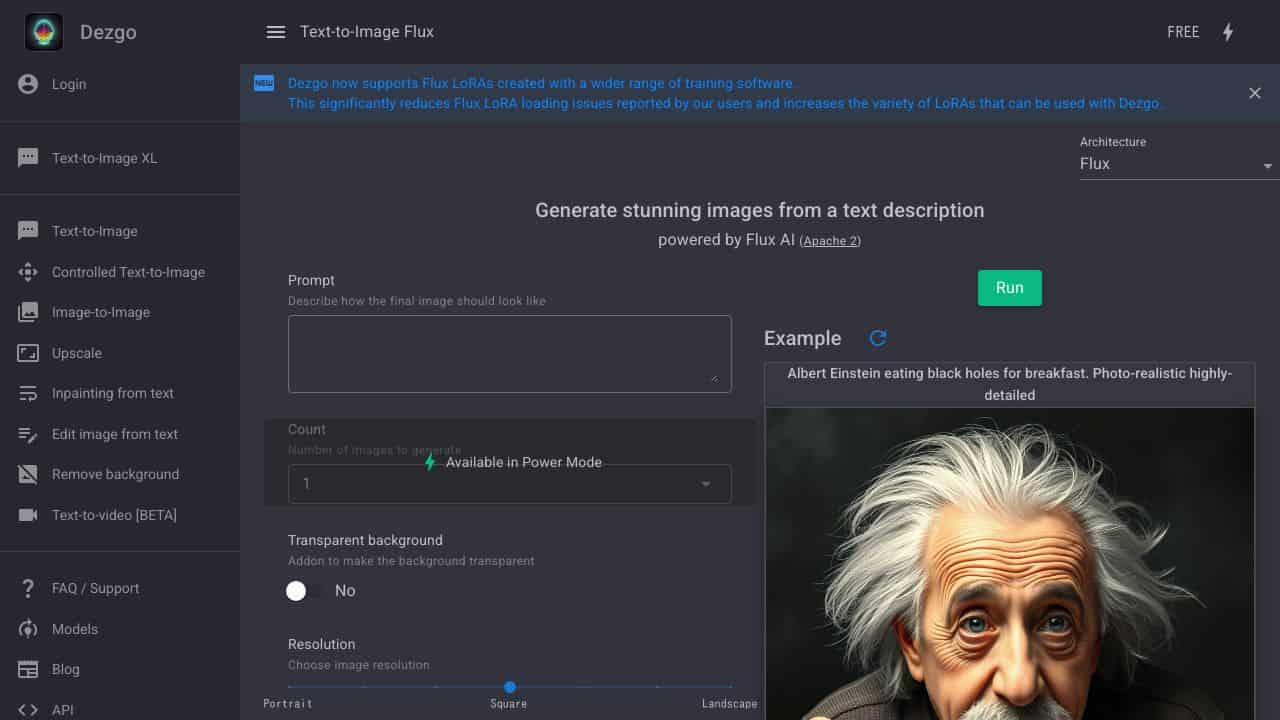
Dezgo is a powerful AI-driven tool that turns your text descriptions into stunning, high-quality images. Built on the Stable Diffusion AImodel, it’s designed for anyone who wants to create visuals quickly and effortlessly. Whether you’re a designer, marketer, or just someone with a creative spark, Dezgo makes it easy to generate images in various styles – realistic, anime, cartoon, or even logos. Think of it as your personal artist, ready to bring your ideas to life with just a few words.
Dezgo Features
Dezgo isn’t just another image generator – it’s packed with features that make it stand out. Here’s what you can do with it:
- Text-to-Image Generation: Create detAIled images from simple text prompts.
- Text-to-Video [BETA]: Turn text into short video clips (still in testing).
- Image-to-Image Transformation: Modify existing images using AI enhancements.
- InpAInting from Text: Edit specific parts of an image by describing what you want.
- Remove Background: Cleanly erase backgrounds from any image.
- Upscale: Boost image resolution using the Real-ESRGAN model (2x upscale supported).
- Controlled Text-to-Image: Adjust AI settings for more precise results.
- Customization Options: Choose models, resolutions, and more to fine-tune your creations.
Dezgo Use Cases
Dezgo is versatile and can be used in countless ways. Here are some examples:
- Graphic Designers: Create complex visuals without spending hours on manual drafting.
- Content Creators: Generate unique images or videos for social media posts, blogs, or YouTube.
- Marketing Agencies: Craft eye-catching visuals for campAIgns or branding materials.
- Game Developers: Conceptualize characters, environments, or items for your next game.
- Academics: Visualize data or abstract concepts for presentations or research.
- Writers: Bring scenes or characters from your stories to life visually.
For instance, imagine you’re a novelist describing a futuristic city. With Dezgo, you can type in your vision and get a high-quality image of that cityscape in seconds. Or, if you’re a marketer, you can generate a series of branded visuals for your next ad campAIgn without hiring a designer.
How Dezgo – AI Text To Media Creation Compares to Alternatives
When choosing an image generator, key factors include pricing, output quality, and specialized features. Free tools like Dezgo offer accessibility, while paid alternatives may provide more advanced options or specific use cases.
| Tool | Best For | Pricing |
|---|---|---|
| Dezgo | Free text-to-image generation with detailed results and experimental text-to-video creation. | Completely free with no subscription required. |
| TattooRed | Specialized AI tattoo design generation with custom styles and placement options. | Freemium model with free basic features. |
| Vheer | Online AI image generation with various artistic styles and editing capabilities. | Freemium with paid upgrades available. |
| Straico | Unified workspace combining multiple AI tools beyond just image generation. | Freemium model for integrated AI solutions. |
Best For
- Budget-conscious marketers needing quick visual content for social media posts.
- Content creators experimenting with AI-generated images for blog illustrations.
- Solopreneurs who want to test text-to-video features without financial commitment.
- Educators creating visual aids from descriptive text prompts for presentations.
Not Ideal For
- Professional designers requiring high-resolution commercial image licensing.
- Businesses needing consistent brand-specific visual style across multiple assets.
- Users who require reliable, production-ready text-to-video generation tools.
Getting Started
Start with specific, descriptive text prompts that include details about composition, style, and mood. For example, instead of ‘a dog,’ try ‘a golden retriever sitting in a sunny meadow at golden hour, photorealistic style.’ Experiment with the text-to-video beta feature using short, clear action descriptions to see its current capabilities.
Key Limitations to Consider
- Text-to-video feature is in beta, meaning it may be unstable or produce inconsistent results.
- Free pricing may limit advanced features available in paid image generators.
- No mention of commercial licensing terms for generated images in the provided information.
- Limited information about image resolution, format options, or batch processing capabilities.
Related Workflows and Tool Pairings
Dezgo fits well into content creation workflows where quick visual assets are needed. After generating images with Dezgo, users typically need image editing tools to refine colors, add text overlays, or adjust composition. These images can then feed into social media scheduling platforms for consistent posting. For the text-to-video beta outputs, video editing software would be necessary to polish, add sound, or combine clips. The tool works best when paired with prompt optimization tools that help craft better text inputs for more accurate results.
Related tools to explore: AI Anime Generator – Anime Art Creator, AI Art Shop – AI PAInting Marketplace, AI Background Generator – AI Custom Backgrounds, AI Headshot Masters – Professional Headshot Generator, AI HentAI Generator – HentAI Art Creator, AI Omnigen – Visual Consistency Generator, Image Generators tools, Text To Image tools
Conclusion
Dezgo is a strong option for anyone who needs to create visuals quickly and efficiently. Its ability to generate high-quality images from text, combined with advanced editing tools like inpAInting and background removal, makes it a useful for designers, marketers, and creators. Whether you’re working on a personal project or a professional campAIgn, Dezgo gives you the tools to bring your ideas to life with ease. Ready to unleash your creativity? Dezgo is here to help.
Pricing
Dezgo – AI Text To Media Creation is afree AI image generators tool. No payment required to get started.
Frequently Asked Questions
What is Dezgo – AI Text To Media Creation?
Dezgo is a powerful AI-driven tool that turns your text descriptions into stunning, high-quality images. Built on the Stable Diffusion AI model, it’s designed for anyone who wants to create visuals quickly and effortlessly. Whether you’re a.
Is Dezgo – AI Text To Media Creation free?
Yes, Dezgo – AI Text To Media Creation is completely free to use.
What are the best Dezgo – AI Text To Media Creation alternatives?
There are many AI image generators tools available. Browse our AI Image Generators tools directory to compare features, pricing, and reviews for the best alternatives.
Last verified: April 2026
Explore more: Browse all AI Image Generators tools | Browse all AI Text To Image tools
