









Quick Verdict
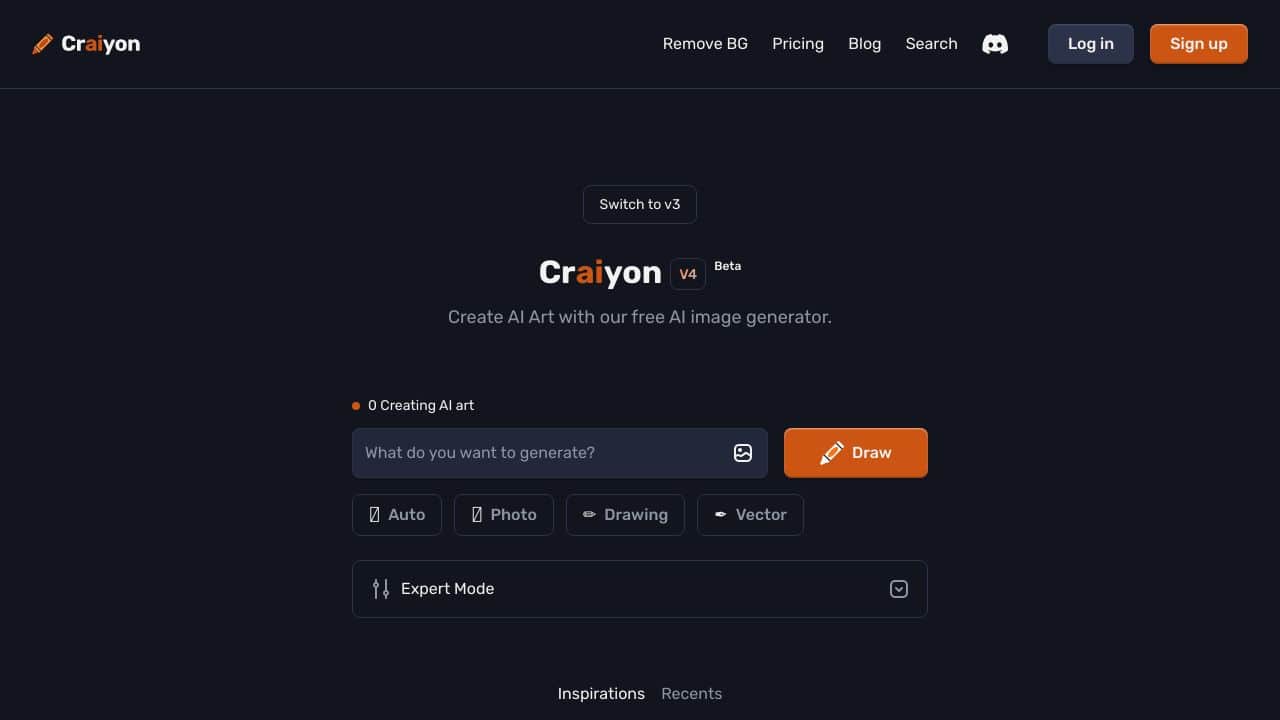
CrAIyon excels at generating multiple image variations quickly and for free, producing nine different options from a single text prompt in minutes. Its pro mode allows users to exclude specific elements from the generated images, offering more control than basic text-to-image tools. However, as a free tool, it likely lacks the advanced features and commercial licensing options of paid competitors. Marketers, content creators, and solopreneurs needing rapid visual concepts without budget constraints should consider CrAIyon.
CrAIyon – Text-to-image AI generation
- Category: Image Generators, Text To Image
- Pricing: Free
- Best for: Smart text-to-picture creation: makes 9 different, pro mode with options to leave out things you
Background Check on CrAIyon – Text-to-image AI generation
We ran a background check on www.crAIyon.com to verify its safety, security posture, hosting infrastructure, and web history. Here are the results as of April 18, 2026.
✓ Cross Origin Resource Sharing (CORS), Redirection, Referrer Policy, Subresource Integrity, X-Content-Type-Options, X-Frame-Options
✗ Content Security Policy (CSP), Strict Transport Security (HSTS)
Source: Mozilla Observatory report
What is it?
CrAIyon (called DALL·E mini) is an AI tool that turns written descriptions into artwork using smart computer programs.
Boris Dayma made this platform to help people create new pictures from simple word prompts letting anyone make art no matter their skill level.

CrAIyon Features
MAIn Abilities
- Smart Text-to-Picture Creation: Makes 9 different images from word descriptions in just a few minutes
- Pro Mode with options to leave out things you don’t want
- Different Styles to Choose From like art, photo, and drawing choices
Tech Standouts
- Uses DALL-E 2 technology to generate sophisticated images
- Has the ability to upscale for higher resolution outputs
- Easy-to-use interface doesn’t need technical know-how
How Can CrAIyon Boost Your Marketing?
Ways to Create Content
- Make one-of-a-kind social media visuals for brand campAIgns
- Produce custom alternatives to product photos
- Design catchy promotional materials
Real-World Uses
- Build consistent brand images across platforms
- make different versions of marketing ideas
- Make custom drawings for blog posts and articles
Money-Saving Options
- Rely less on professional photography
- Make endless marketing assets with little spending
- Quickly test visual ideas
Questions About CrAIyon
What’s the difference between free and pAId versions?
The free version gives you basic image creation with ads. PAId versions let you make images faster, create as many as you want, and don’t add watermarks.
Can I use the images I create for business?
Yes, you can use the images for personal, school, or business reasons. Free users need to give credit when they use them.
How long does it take to make images?
, the system creates 9 images in 1-2 minutes. If you pay, you can get your images even quicker.
Are there rules about what I can create?
Yes, the system has filters and rules built in to stop people from making inappropriate or harmful content.
How can I make better quality images?
Give clear instructions, use Expert Mode to refine, and make the most of the upscaling option to get better quality images.
How CrAIyon – Text-to-image AI generation Compares to Alternatives
When evaluating text-to-image AI tools, key factors include output quality, generation speed, customization options, and pricing structure. Free tools like CrAIyon offer accessibility but may have limitations compared to freemium or paid alternatives that provide higher resolution, commercial rights, or specialized features.
| Tool | Best For | Pricing |
|---|---|---|
| CrAIyon | Generating nine image variations quickly from text prompts, with free access and basic exclusion controls. | Completely free with no paid tiers. |
| TattooRed | Creating custom tattoo designs specifically, with AI tailored to body art styles and placements. | Freemium model with paid upgrades. |
| Vheer | Online image generation with likely web-based convenience and multiple style options. | Freemium with premium features. |
| Straico | Integrated AI workspace combining text-to-image with other AI tools in one platform. | Freemium with unified access. |
Best For
- Content creators needing quick visual concepts for social media posts or blogs.
- Marketers prototyping ad visuals or campaign imagery without budget.
- Solopreneurs generating logo ideas or website graphics from text descriptions.
- Educators creating illustrative materials for presentations or teaching aids.
Not Ideal For
- Professional designers requiring high-resolution, print-ready images with commercial licenses.
- Businesses needing consistent brand visuals with precise color and style controls.
- Users seeking advanced editing features like inpainting or detailed parameter tuning.
Getting Started
Start with clear, descriptive text prompts that include specific details about style, subject, and composition. Experiment with the pro mode’s exclusion feature to remove unwanted elements from your generated images. Review all nine variations to identify which aspects of your prompt yield the best results.
Key Limitations to Consider
- Image resolution and quality may be lower than paid tools, limiting professional use.
- Lacks advanced customization options like seed control or detailed style mixing.
- Free access means no commercial licensing guarantees for business applications.
- Generation speed of a few minutes may be slower than some premium alternatives.
- Limited to text-to-image without integrated editing or enhancement features.
Related Workflows and Tool Pairings
CrAIyon fits naturally into early-stage creative workflows where rapid ideation is valued over polished final assets. Use it to generate initial visual concepts for marketing campaigns, blog illustrations, or social media content. The nine variations provide multiple directions to explore before refining selections. This tool pairs well with image editing software for post-processing adjustments, such as cropping, color correction, or adding text overlays. It also complements design platforms where generated images serve as base layers for more complex compositions. For workflows requiring legal compliance, pairing with copyright check tools ensures generated images meet usage requirements.
Related tools to explore: AI Anime Generator – Anime Art Creator, AI Art Shop – AI PAInting Marketplace, AI Background Generator – AI Custom Backgrounds, AI Headshot Masters – Professional Headshot Generator, AI HentAI Generator – HentAI Art Creator, AI Omnigen – Visual Consistency Generator, Image Generators tools, Text To Image tools
Conclusion
CrAIyon marks a big step forward in AI-driven creativity offering an easy-to-use platform to create digital art. Its mix of user-friendly design and strong AI tech makes it a key tool for companies, artists, and marketers who want to boost their visual content game. For personal projects or work needs, CrAIyon’s skills keep growing making it a top choice in the AI art creation world.
Pricing
CrAIyon – Text-to-image AI generation is afree AI image generators tool. No payment required to get started.
Frequently Asked Questions
What is CrAIyon – Text-to-image AI generation?
CrAIyon (called DALL·E mini) is an AI tool that turns written descriptions into artwork using smart computer programs.
Is CrAIyon – Text-to-image AI generation free?
Yes, CrAIyon – Text-to-image AI generation is completely free to use.
What are the best CrAIyon – Text-to-image AI generation alternatives?
There are many AI image generators tools available. Browse our AI Image Generators tools directory to compare features, pricing, and reviews for the best alternatives.
Last verified: April 2026
Explore more: Browse all AI Image Generators tools | Browse all AI Text To Image tools
