
Key takeaways
- Visual gaps come from short shoot days, abstract ideas, script changes, budget limits and new ad variants, and they usually surface late in the edit.
- AI B-roll tools create a shot from a description of subject, camera movement, lighting and mood, or find a library clip, and some place it against the script.
- Generated shots should match the color and continuity of the edit, and must never show a product doing something it cannot do.
- AI B-roll works best for supporting shots, with product details and key moments taken from real footage.
In this post6 sections
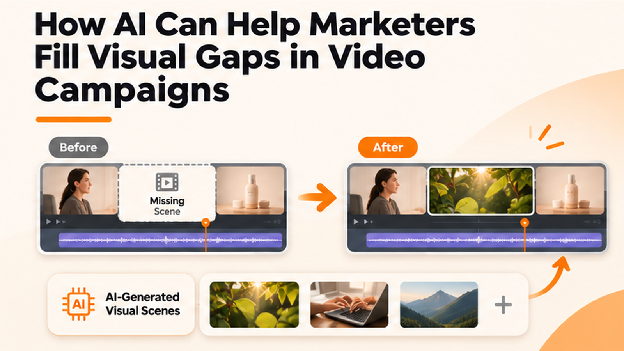
A visual gap is a moment in a video where the story needs an image the team does not have. A voiceover describes a bustling city, but the footage shows only a desk. An interview runs for a minute with nothing to cut away to. A campaign talks about growth or security, and there is nothing concrete to show. These gaps are common in marketing video, and they are usually discovered late, when the edit is already underway.
AI B-roll gives marketers a new way to close them. B-roll is the supporting footage that fills in around the main content, and AI tools can now create it from a description or find a suitable clip and place it where it belongs. This article looks at where visual gaps come from, the options for filling them, how AI B-roll works, and what to check so that filled gaps look believable and stay on-brand.
Where Visual Gaps Come From
Gaps rarely come from carelessness. They are a natural result of how campaigns are made.
Limited shoot time. A single shoot day has a long list of priorities, and supporting shots are often the first to be cut when time runs short.
Abstract ideas. Concepts like efficiency, trust, or data are hard to film directly, so the script outpaces the footage.
Changing scripts. A line added during editing may call for a visual that was never planned.
Budget limits. Travel, locations, and extra crew cost money, so many teams cannot reshoot every missing moment.
Versions and variants. An ad adapted for a new audience or market may need visuals the original shoot never covered.
Seasonal and timely needs. A campaign refreshed for a holiday or an event may need footage from a setting that is not available to film.
How AI B-Roll Works
The process behind AI B-roll is simple in concept. A marketer describes the shot a moment needs, and the tool creates it or finds a suitable clip. Because the description can name the subject, the camera movement, the lighting, and the mood, the result can match a specific line of the script instead of approximating it.
The strongest tools go a step further and place the footage. They can read the script or the dialogue, identify moments that need visual support, and position clips against the lines they illustrate, so the editor starts from a draft that already has coverage. If a clip is not right, the marketer describes the change, such as a slower camera move, a different time of day, or a tighter framing, and the tool revises it.
Good descriptions make a large difference. Naming the setting, the movement, the light, and the feeling gives the tool far more to work with than a vague request. It also helps to say what should not appear, such as text, logos, or people, since unwanted details are easier to prevent than to remove.
Keeping Filled Gaps Believable and On-Brand
A generated shot should disappear into the video, not call attention to itself. A few checks help.
Match the look. Footage generated separately can differ in color and contrast, so a shared color treatment helps all clips read as one piece.
Watch continuity. A shot should fit the surrounding footage in lighting, season, and setting.
Be careful with people. Faces and hands in generated footage can look slightly off, so close inspection matters. Scenes without people, such as environments, objects, and textures, are often the safest.
Never overstate the product. B-roll that shows a product doing something it cannot do misleads viewers. Product detail should come from real footage and accurate imagery.
Check for artifacts. Distorted shapes, flicker, and stray lettering can appear in generated footage and should be caught before publishing.
Confirm usage terms. The tool’s rules for commercial use matter for paid campaigns.
Consider disclosure. Some platforms and regions have rules about AI-generated or altered content, so it is worth checking current requirements.
Invideo Editor: Generating B-Roll Inside the Edit
Invideo Editor keeps gap-filling inside the editing project. Its AI b-roll generator lets an AI agent create custom B-roll from a description, using access to 200+ AI models, or find suitable footage from a built-in library. The clips land on an editable multitrack timeline next to the rest of the project.
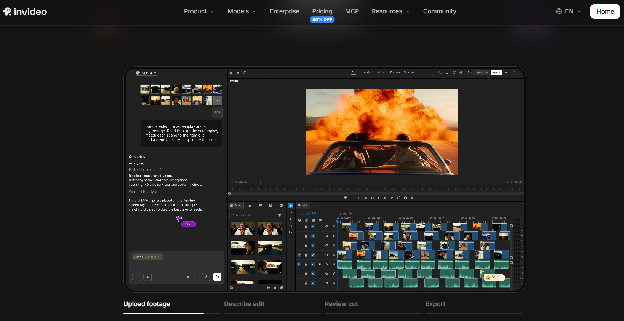
- Custom B-roll generated from a detailed description, covering subject, camera movement, lighting, and mood
- Footage, music, and sound effects searchable from inside the editor when an existing clip fits better
- Analysis of a script or dialogue to identify moments that need visual support, though a script is not required
- Placement and timing of B-roll against the lines it supports
- Several shots generated at once, with complex shots handled individually for better control
- Revisions made by describing a change, with every clip still editable after it is added
- Generated voiceovers and music that can be added directly to the timeline
- Color grading from a described look or a reference image, to help separate clips read as one piece
- A multitrack timeline for trimming, arranging, and finishing by hand
For marketers, the practical benefit is that a gap found late in the edit can be closed without leaving the project. A moment needing a city shot, a close-up, or a visual for an abstract idea can be described, generated, placed, and reviewed in the same place. Generated footage should still be checked for brand fit before it reaches a client. The manual timeline is free to use, while generating B-roll with the agent runs on credits through paid plans.
What Marketers Gain
Filling gaps with AI B-roll changes a few things about how campaigns come together.
Fewer reshoots. Gaps discovered during editing no longer have to mean going back out to film.
Faster turnaround. A missing shot can be created in minutes, which helps with tight schedules.
Flexibility for versions. Variants for new audiences or markets can get visuals tailored to them.
More room for ideas. Abstract concepts and hard-to-film settings become easier to show.
Better use of the shoot day. Teams can concentrate on the footage that matters most, knowing supporting shots can be created later.
Final Thoughts
Visual gaps are an ordinary part of making campaign video, and AI B-roll gives marketers a practical way to close them. The strongest results come from clear descriptions, careful review, and a consistent look across everything in the edit.
The goal is not to replace real footage. It is to make sure every moment in a video has something worth looking at, so the story can carry viewers from the first second to the last.
Frequently asked questions
What is a visual gap in a video?
It is a moment where the story needs an image the team does not have, such as a cutaway for an interview, a product detail, or a visual for an abstract idea.
Can AI create B-roll for a campaign?
Yes. Some tools generate custom B-roll from a description or find suitable footage, then place it against the relevant lines. Generated footage should be reviewed for quality and brand fit.
Should AI B-roll replace real footage?
It works best alongside real footage. Product details and key moments should come from real, accurate imagery, with generated B-roll covering supporting shots.
Can I fill gaps without a script?
Yes. Tools like Invideo Editor can work from a script or dialogue to find moments that need visuals, but they can also generate shots from descriptions alone.
How do I keep generated shots consistent with the rest of the video?
Apply a shared color treatment, check continuity with surrounding footage, and review every clip. In an editor like Invideo Editor, color grading from a described look or reference image helps clips read as one piece.