
















Quick Verdict
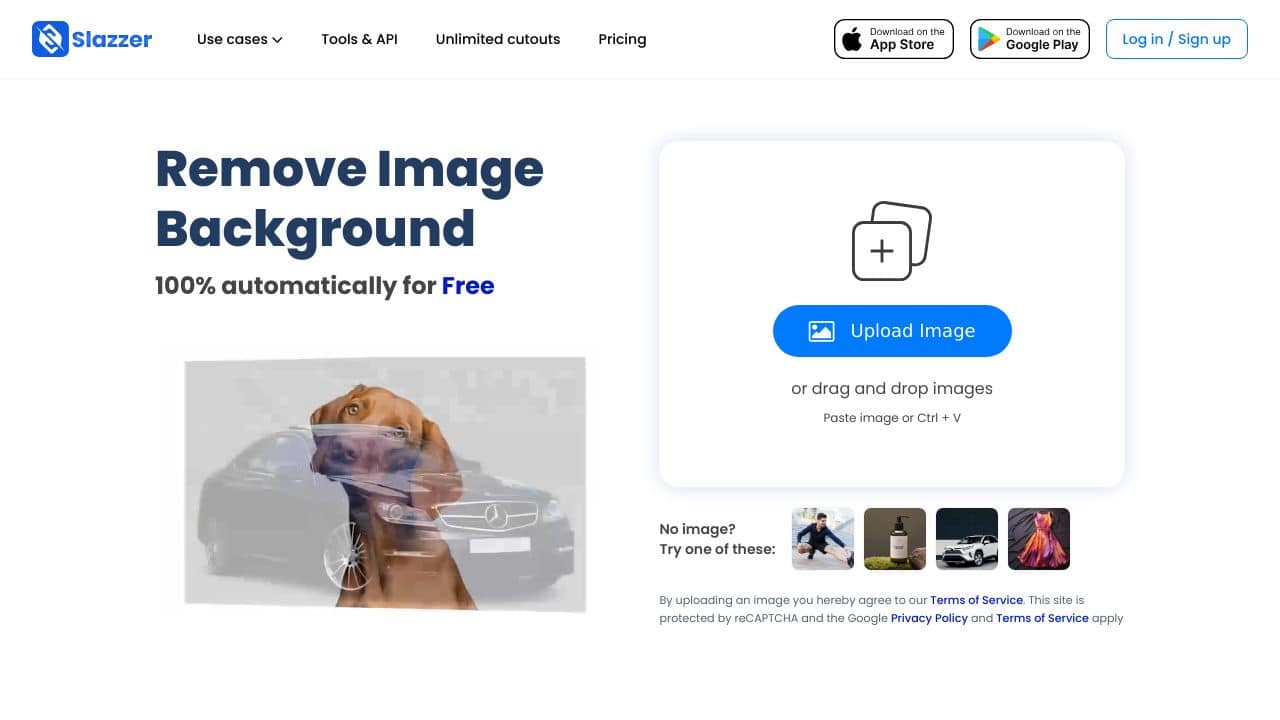
Slazzer excels at 100% automatic background removal with precise edge handling, making it ideal for quick, high-quality cutouts. Its main limitation is that it focuses solely on background removal without additional editing features. Marketers and e-commerce sellers who need fast, reliable image processing for product photos or marketing materials should consider this tool. The free trial makes it easy to test before committing.
Slazzer – AI Image Background Removal
- Category: Design Generators, E-Commerce, Image Editing
- Pricing: Free Trial
- Best for: E-commerce sellers removing product photo backgrounds
Background Check on Slazzer – AI Image Background Removal
We ran a background check on www.facebook.com to verify its safety, security posture, hosting infrastructure, and web history. Here are the results as of April 19, 2026.
What is Slazzer?
Slazzer is an AI-powered tool that removes backgrounds from images automatically, saving you time and effort. Whether you’re a designer, marketer, or photographer, Slazzer delivers high-quality cutouts in seconds. With over millions of backgrounds removed every month, it’s trusted by users worldwide. Plus, it’s GDPR-compliant, ensuring your data is safe. Need a quick edit? Just upload your image, and Slazzer does the rest.
Slazzer Features
- 100% Automatic Background Removal: Upload an image, and Slazzer instantly removes the background with precision.
- High-Quality Cutouts: Handles complex edges like hAIr, fur, and intricate detAIls effortlessly.
- Desktop App: Available for Windows, Mac, and Linux, allowing bulk processing of thousands of images.
- API & Integrations: Easily integrates with design tools, apps, and eCommerce platforms for smooth workflows.
- Free Tier: Start with basic functionality and upgrade as needed.
- Fast Processing: Get results in just 5 seconds per image.
Slazzer Use Cases
- E-commerce: Create professional product images with transparent backgrounds for online stores.
- Social Media: Design eye-catching visuals for Instagram, Facebook, and other platforms.
- Photography: Save hours by automating background removal for portrAIts or event photos.
- Marketing Agencies: Produce polished campAIgn materials quickly and efficiently.
- Education: Teach students about digital editing tools in media or design courses.
- Car Dealerships: Showcase vehicles with clean, transparent backgrounds for ads or websites.
How Slazzer – AI Image Background Removal Compares to Alternatives
When choosing an AI design tool, consider whether you need specialized functions like background removal or broader creative generation. Slazzer competes in a category where speed, accuracy, and specific use cases matter most. Evaluate tools based on your primary need: automated editing versus creative generation.
| Tool | Best For | Pricing |
|---|---|---|
| Slazzer – AI Image Background Removal | Automatic background removal with precise edge handling for e-commerce and marketing images. | Free trial available. |
| BeYourCover – AI Book Cover Generator | Authors and publishers needing AI-generated book covers with minimal design effort. | Freemium model with paid upgrades. |
| Wallpapers.fyi – AI Wallpaper Generation Platform | Users creating custom wallpapers or backgrounds for digital displays. | Free to use. |
| ThumbnailAi – AI Thumbnail Rating Platform | Content creators optimizing YouTube or social media thumbnails for engagement. | Free platform. |
Best For
- E-commerce sellers removing backgrounds from product photos quickly.
- Marketers creating clean cutouts for ads or social media posts.
- Designers handling complex edges like hair or fine details automatically.
- Solopreneurs needing fast image processing without manual editing skills.
Not Ideal For
- Users needing full-featured image editing beyond background removal.
- Creatives generating original artwork or text-based images from scratch.
- Teams requiring collaborative design tools with version control.
Getting Started
Start by uploading a high-contrast image with clear edges to test Slazzer’s precision. Use the free trial to process multiple image types, like product shots or portraits, to gauge consistency. Save your cutouts in PNG format to preserve transparency for immediate use in designs.
Key Limitations to Consider
- Only removes backgrounds, lacking tools for color correction or retouching.
- May struggle with extremely low-resolution or blurry input images.
- Free trial may have usage limits compared to paid plans.
- No built-in templates or design elements for creating complete graphics.
- Requires internet connection as it is a web-based tool.
Related Workflows and Tool Pairings
Slazzer fits into workflows where clean image cutouts are a first step. After removing backgrounds, users often import images into graphic design software like Canva or Adobe Express to add text, overlays, or layouts. For e-commerce, pair it with inventory management tools to batch-process product photos. In marketing, combine it with social media schedulers to quickly prepare visuals for campaigns. Complementary tool types include graphic design platforms for finishing touches and project management tools for organizing image assets.
Related tools to explore: 3DFY – AI 3D Model Creator, AI Background Generator – AI Custom Backgrounds, AI Character Generator – AI Storyboard Character Creation, AI Home Design – AI Virtual Staging Renovations, AI Interior Design – Smart Space Designer, AI Logo Generator – AI Logo Creator, Design Generators tools, E-Commerce tools
Conclusion
Slazzeris a strong option for anyone who works with images. Its AI-powered background removal is fast, accurate, and incredibly user-friendly. Whether you’re editing a single photo or processing thousands, Slazzer streamlines your workflow and delivers professional results. With features like bulk processing, API integrations, and high-quality cutouts, it’s no wonder millions of users trust Slazzer. Ready to simplify your image editing? Give Slazzer a try – it’s free to start!
- https://www.facebook.com/slazzercom/
- https://twitter.com/slazzerCom
- https://www.instagram.com/slazzer_com/
- https://www.linkedin.com/company/slazzer
Pricing
Slazzer – AI Image Background Removal offers afree trial so you can test it before committing. Visit the official website for full pricing details.
Frequently Asked Questions
What is Slazzer – AI Image Background Removal?
Slazzer is an AI-powered tool that removes backgrounds from images automatically, saving you time and effort. Whether you’re a designer, marketer, or photographer, Slazzer delivers high-quality cutouts in seconds. With over millions of.
Is Slazzer – AI Image Background Removal free?
Slazzer – AI Image Background Removal offers a free trial period. After the trial, a paid subscription is required for continued access.
What are the best Slazzer – AI Image Background Removal alternatives?
There are many AI design generators tools available. Browse our AI Design Generators tools directory to compare features, pricing, and reviews for the best alternatives.
Last verified: April 2026
Explore more: Browse all AI Design Generators tools | Browse all AI E-Commerce tools
