












Quick Verdict
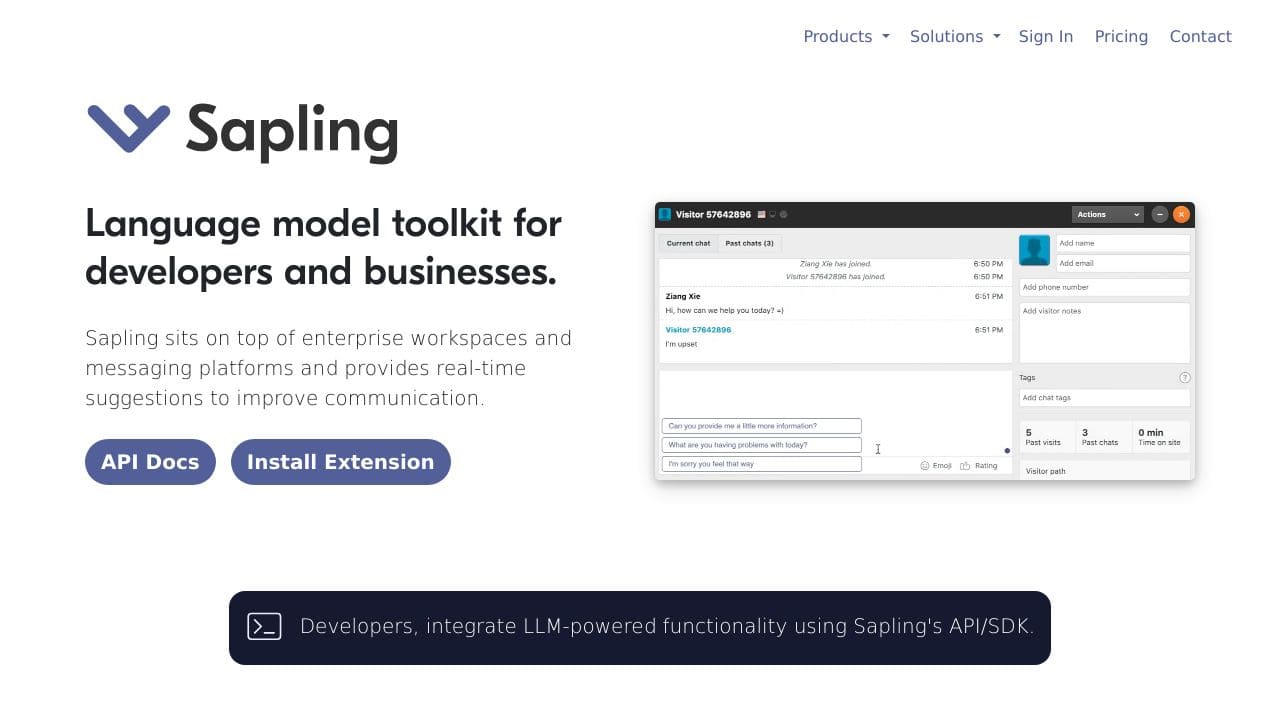
Sapling excels at providing real-time suggestions to improve team communication clarity and professionalism across messaging platforms. Its autocomplete everywhere feature powered by deep learning helps users write more effectively in the moment. However, as an AI detection tool, it may not catch all nuanced communication issues that require human judgment. Marketers, sales teams, and customer support professionals who need to maintain polished written communication should consider this tool.
Sapling – AI Team Communication Suggestions
- Category: AI Detection Tools, Customer Support, Sales Assistant
- Pricing: Freemium
- Best for: Teams wanting better written communication
Background Check on Sapling – AI Team Communication Suggestions
We ran a background check on twitter.com to verify its safety, security posture, hosting infrastructure, and web history. Here are the results as of April 19, 2026.
✓ Cookies, Cross Origin Resource Sharing (CORS), Redirection, Strict Transport Security (HSTS), X-Content-Type-Options, X-Frame-Options
✗ Content Security Policy (CSP), Subresource Integrity
Source: Mozilla Observatory report
What is Sapling?
Sapling is an AI-powered language model toolkit designed to boost communication for developers and businesses. Think of it as your personal copilot for crafting better, faster, and more professional messages. Trusted by big names like Nasdaq-100 Software Co. and Fortune 50 Healthcare Co., Sapling integrates smoothly into enterprise workspaces and messaging platforms, offering real-time suggestions to improve grammar, tone, and overall communication quality. Whether you’re a developer or a business leader, Sapling is here to make your life easier.
Sapling Features
- Real-Time Suggestions: Get instant feedback to improve your messages, ensuring clarity and professionalism.
- Autocomplete Everywhere™: Deep learning-powered autocomplete that works across multiple platforms, saving you time.
- Advanced Grammar Checks: Machine learning algorithms catch and correct language errors, from typos to complex grammar issues.
- Custom Compliance Settings: TAIlor the tool to meet your organization’s compliance and governance needs.
- smooth Integrations: Works with popular platforms like Salesforce, Zendesk, Amazon Connect, and Twilio Flex.
- Enterprise Security: TLS and AES-256 encryption, PII redaction, and self-hosted deployment options for maximum data protection.
Sapling Use Cases
- Customer Support Teams: Handle high volumes of queries with quick, accurate, and professional responses.
- Sales Teams: Craft personalized messages to engage potential clients and close deals faster.
- Success Teams: Ensure timely and accurate responses to keep customers happy and loyal.
- Enterprise Organizations: MAIntAIn compliance and governance in all communications, reducing risks.
- Non-Profits: Manage donor interactions with polished, professional messaging.
- Educational Institutions: Streamline admissions and inquiries with efficient, error-free communication.
How Sapling – AI Team Communication Suggestions Compares to Alternatives
When evaluating AI communication tools, key factors include real-time functionality, integration capabilities, and pricing transparency. Sapling competes in a space where tools range from plagiarism checkers to deepfake detectors, each serving different communication needs.
| Tool | Best For | Pricing |
|---|---|---|
| Sapling – AI Team Communication Suggestions | Real-time writing suggestions for team messaging and customer communications | Freemium model with basic features free |
| Plagicure – Avoid Plagiarism and AI Detection | Detecting plagiarism and AI-generated content in documents and essays | Freemium with limited free checks |
| Free AI Essay Writer – AI Essay Writing Tool | Generating complete essays and long-form content from prompts | Completely free with no paid tiers |
| Clarity – AI Deepfake Detection Tool | Identifying deepfake media and synthetic video/audio content | Contact for custom enterprise pricing |
Best For
- Customer support teams needing polished, professional response templates
- Sales professionals crafting consistent messaging across client communications
- Remote teams maintaining clear written communication in chat platforms
- Non-native English speakers improving business communication clarity
Not Ideal For
- Creative writers needing unrestricted, artistic expression in their work
- Technical documentation requiring precise, unaltered terminology
- Users needing deepfake detection or media authenticity verification
Getting Started
Install the browser extension first to activate autocomplete everywhere across your most used platforms. Start with the free version to test suggestions in your team’s Slack or email client. Pay attention to which suggestions you accept versus ignore to understand the tool’s value for your specific communication style.
Key Limitations to Consider
- May over-suggest formal language in casual team communication contexts
- Deep learning models can occasionally miss industry-specific terminology nuances
- Freemium version likely has usage limits on advanced suggestion features
- Real-time suggestions require stable internet connection to function properly
- Primarily focuses on written text rather than spoken communication improvement
Related Workflows and Tool Pairings
Sapling fits naturally into daily communication workflows where teams collaborate through written channels like email, Slack, or CRM platforms. It works best when integrated early in the message drafting process, providing immediate feedback before messages are sent. This tool pairs well with CRM systems for maintaining consistent customer communication, project management platforms for clear task delegation, and knowledge base software for standardized response templates. For a complete communication stack, consider combining Sapling with meeting transcription tools to capture verbal discussions and content management systems for storing approved messaging templates. The real-time nature makes it particularly valuable for fast-paced environments where quick, polished responses are essential.
Related tools to explore: AHelp – AI Writing Enhancement Platform, AI Detector Pro – AI Detection Suite, AI Detector – AI Generated Content Detection, AI Humanizer – Data Privacy Guardian, AI Undetect – Undetectable Writing Assistant, AI Voice Detector – Voice Verification Tool, AI Detection Tools tools, Customer Support tools
Conclusion
Saplingis more than just an AI tool – it’s a strong option for anyone looking to improve their communication game. With features like real-time suggestions, advanced grammar checks, and smooth integrations, it’s designed to make your life easier while boosting productivity and professionalism. Whether you’re a developer, a salesperson, or part of a large enterprise, Sapling has something to offer. Ready to enhances? Give Sapling a try – no credit card required!
- mAIlto:[email protected]
- https://twitter.com/saplingAI
- https://www.facebook.com/Sapling-Intelligence-684416121988762/
- https://discord.gg/p5gDc684TX
- https://www.linkedin.com/company/saplingAI
- https://www.youtube.com/channel/UCECmwMysTpmB3jQoo5HJOmw
Pricing
Sapling – AI Team Communication Suggestions offers afreemium plan with optional paid upgrades. Get started for free and upgrade as needed.
Frequently Asked Questions
What is Sapling – AI Team Communication Suggestions?
Sapling is an AI-powered language model toolkit designed to boost communication for developers and businesses. Think of it as your personal copilot for crafting better, faster, and more professional messages. Trusted by big names like Nasdaq-100.
Is Sapling – AI Team Communication Suggestions free?
Sapling – AI Team Communication Suggestions offers a free plan with limited features. Paid plans are available for additional capabilities.
What are the best Sapling – AI Team Communication Suggestions alternatives?
There are many AI ai detection tools tools available. Browse our AI AI Detection Tools tools directory to compare features, pricing, and reviews for the best alternatives.
Last verified: April 2026
Explore more: Browse all AI AI Detection Tools tools | Browse all AI Customer Support tools
