












Quick Verdict
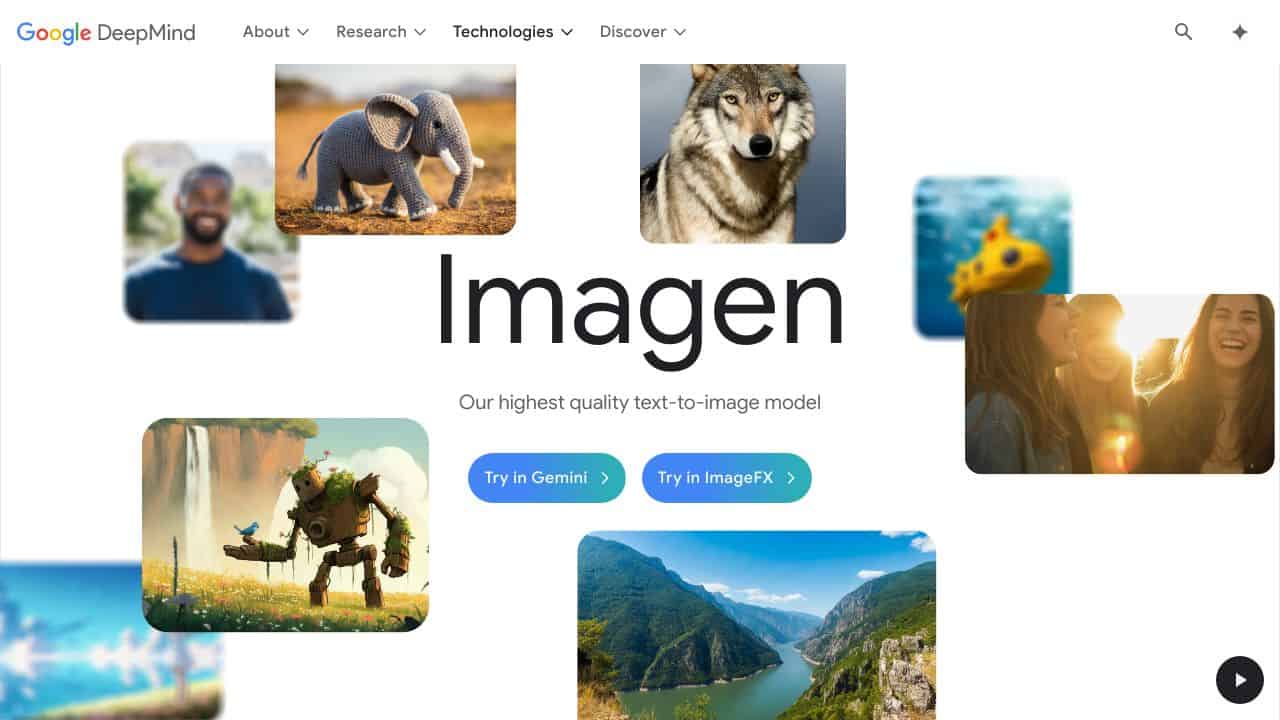
Google Imagen 3 excels at generating photorealistic images with rich textures and high-fidelity details that stand out visually. One limitation is its focus on photorealism, which may not suit all creative styles. Marketers needing polished visual assets for campaigns, founders creating product mockups, and designers seeking realistic textures should consider this free tool.
Google Imagen 3 – AI Photorealism Image Generation
- Category: Design Generators, Image Generators, Text To Image
- Pricing: Free
- Best for: Creatives needing ultra-realistic AI images
Background Check on Google Imagen 3 – AI Photorealism Image Generation
We ran a background check on cascaded-diffusion.github.io to verify its safety, security posture, hosting infrastructure, and web history. Here are the results as of April 19, 2026.
✓ Strict Transport Security (HSTS), Cross Origin Resource Sharing (CORS), Redirection
✗ Subresource Integrity, X-Content-Type-Options, X-Frame-Options, Content Security Policy (CSP)
Source: Mozilla Observatory report
What is Imagen 3?
Imagen 3is Google’s latest and most advanced text-to-image AI model. It’s designed to generate high-quality, photorealistic images from simple text prompts. Think of it as a digital artist that can turn your words into stunning visuals – whether it’s a dreamy landscape, a detAIled portrAIt, or even a whimsical claymation scene. Withgreater detAIl, fewer artifacts, and improved prompt understanding, Imagen 3 is setting a new standard for AI-generated imagery. Human evaluators even prefer it over other leading models, thanks to its ability to deliver visually rich, artifact-free images that align perfectly with user prompts.
Imagen 3 Features
- High-Fidelity DetAIl: Richer textures and enhanced detAIls make images more visually compelling.
- Diverse Art Styles: From photorealism to anime, Imagen 3 can render a wide range of artistic styles with precision.
- Better Text Rendering: It excels at generating stylized text, making it perfect for birthday cards, presentations, and more.
- Natural Language Understanding:No need for complex prompt engineering – Imagen 3 understands everyday language.
- Safety and Security: Built with advanced safety measures, including SynthID, a watermarking tool that ensures AI-generated images are identifiable.
Imagen 3 Use Cases
- Creative Professionals: Artists and designers can use Imagen 3 to bring their ideas to life, whether it’s a surreal digital pAInting or a photorealistic product mockup.
- Marketing Teams: Generate eye-catching visuals for campAIgns, social media posts, or advertisements in seconds.
- Filmmakers and Animators: Conceptualize scenes, characters, or storyboards with ease. Imagine creating a cinematic galaxy or a wartime trAIn station with just a few words.
- Educators and Researchers: Use Imagen 3 to create visual AIds for teaching or to explore the boundaries of AI-generated art.
- Everyday Users: Want a custom birthday card or a unique wallpaper? Imagen 3 can make it happen.
How Google Imagen 3 – AI Photorealism Image Generation Compares to Alternatives
When choosing an AI image generator, consider output quality, style versatility, and cost. This section compares Google Imagen 3 to alternatives based on their strengths and pricing models.
| Tool | Best For | Pricing |
|---|---|---|
| Google Imagen 3 – AI Photorealism Image Generation | Photorealistic images with rich textures and high-fidelity details for professional visuals. | Free, no subscription required. |
| BeYourCover – AI Book Cover Generator | Authors and publishers needing custom book covers with genre-specific designs. | Freemium model with paid upgrades. |
| Wallpapers.fyi – AI Wallpaper Generation Platform | Creating personalized wallpapers for devices with quick, aesthetic outputs. | Free platform for wallpaper generation. |
| ThumbnailAi – AI Thumbnail Rating Platform | Content creators optimizing YouTube or social media thumbnails for engagement. | Free tool for thumbnail analysis. |
Best For
- Marketers creating realistic product mockups for ad campaigns.
- Designers needing high-detail textures for digital art projects.
- Founders prototyping app interfaces with photorealistic elements.
- Content producers generating stock-like images for blogs or social media.
Not Ideal For
- Users needing abstract or cartoonish art styles like anime.
- Projects requiring real-time image generation with instant edits.
- Teams needing collaborative features for shared design workflows.
Getting Started
Start by describing scenes with specific textures, like ‘sunset over a textured brick wall’ to leverage Imagen 3’s strength in detail. Experiment with lighting terms such as ‘golden hour’ or ‘soft shadows’ to enhance photorealism. Avoid vague prompts to get the best results from this free tool.
Key Limitations to Consider
- Limited to photorealistic styles, not ideal for abstract or cartoon art.
- No built-in editing tools for post-generation adjustments.
- May require precise prompts to achieve desired texture details.
- Free access could involve usage limits or queue times during peak hours.
Related Workflows and Tool Pairings
Google Imagen 3 fits into visual content creation workflows by generating base images that can be refined elsewhere. For example, use it to create photorealistic product mockups, then import them into graphic design software for branding elements like logos or text overlays. Pair it with image editing tools to adjust colors, crop, or add effects, and with project management platforms to organize assets for marketing campaigns. This tool excels at the initial visualization stage, saving time on sourcing or shooting photos, while complementary tools handle customization and integration into final deliverables.
Related tools to explore: 3DFY – AI 3D Model Creator, AI Background Generator – AI Custom Backgrounds, AI Character Generator – AI Storyboard Character Creation, AI Home Design – AI Virtual Staging Renovations, AI Interior Design – Smart Space Designer, AI Logo Generator – AI Logo Creator, Design Generators tools, Image Generators tools
Conclusion
Imagen 3 is a strong option in the world of AI-generated imagery. Its ability to understand complex prompts and deliver high-quality, detAIled images makes it a powerful tool for creatives, marketers, and even casual users. Whether you’re crafting a photorealistic landscape or a whimsical claymation scene, Imagen 3 brings your vision to life with stunning accuracy. With its focus on safety, versatility, and user-friendly design, it’s no wonder that Imagen 3 is leading the pack in text-to-image AI models. Ready to see what it can do? The future of visual storytelling is here.
Pricing
Google Imagen 3 – AI Photorealism Image Generation is afree AI design generators tool. No payment required to get started.
Frequently Asked Questions
What is Google Imagen 3 – AI Photorealism Image Generation?
Imagen 3 is Google’s latest and most advanced text-to-image AI model. It’s designed to generate high-quality, photorealistic images from simple text prompts. Think of it as a digital artist that can turn your words into stunning.
Is Google Imagen 3 – AI Photorealism Image Generation free?
Yes, Google Imagen 3 – AI Photorealism Image Generation is completely free to use.
What are the best Google Imagen 3 – AI Photorealism Image Generation alternatives?
There are many AI design generators tools available. Browse our AI Design Generators tools directory to compare features, pricing, and reviews for the best alternatives.
Last verified: April 2026
Explore more: Browse all AI Design Generators tools | Browse all AI Image Generators tools
