
















Quick Verdict
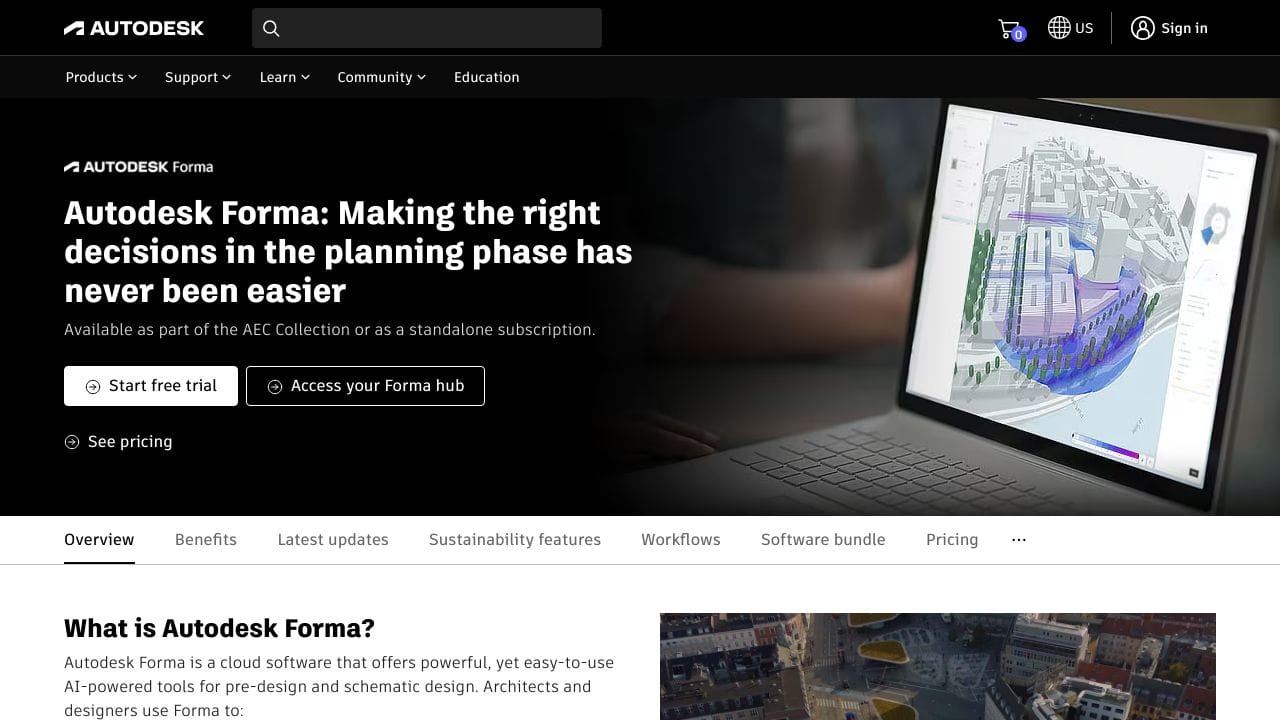
Autodesk Forma excels at geolocated AEC design collaboration, letting teams set up projects with real-world contextual data in minutes and generate automated massing takeoffs. Its paid pricing model may be a barrier for solo practitioners or small firms on tight budgets. This tool is best for architecture, engineering, and construction professionals working on geolocated projects who need integrated 3D design and project management capabilities.
Autodesk Forma – AI Aec Design Collaboration
- Category: 3D, Design Generators, Project Management
- Pricing: Paid
- Best for: Architects and urban planners collaborating on projects
Background Check on Autodesk Forma – AI Aec Design Collaboration
We ran a background check on twitter.com to verify its safety, security posture, hosting infrastructure, and web history. Here are the results as of April 18, 2026.
✓ Cookies, Cross Origin Resource Sharing (CORS), Redirection, Strict Transport Security (HSTS), X-Content-Type-Options, X-Frame-Options
✗ Content Security Policy (CSP), Subresource Integrity
Source: Mozilla Observatory report
What is Autodesk Forma?
Autodesk Forma is a cloud-based AI-powered platform designed to transform the way architects, engineers, and construction professionals approach pre-design and schematic design. It simplifies complex tasks like site analysis, environmental impact assessments, and 3D modeling, enabling users to make data-driven decisions faster. With features like real-time environmental analysis and smooth integration with tools like Revit, Rhino, and Dynamo, Forma is a strong option for the AEC industry. Did you know that users have reported a 15% increase in efficiency and a 90% reduction in project setup time? That’s the power of Forma.
Autodesk Forma Features
- Geolocated Projects: Set up projects with real-world contextual data in minutes.
- Automated Massing Takeoffs: Quickly generate 3D models for capacity studies.
- Real-Time Environmental Analysis: Assess wind, solar, daylight, and embodied carbon impacts.
- smooth Integrations: Connect with Revit, Rhino, and Dynamo for detAIled design workflows.
- Embodied Carbon Analysis: Understand the carbon footprint of your designs early in the process.
- Custom APIs and Extensions: TAIlor Forma to your specific needs with third-party tools.
Autodesk Forma Usecases
- Architects: Use Forma to explore design concepts, optimize for sustAInability, and present data-driven insights to clients. For example, Baker Barrios Architects improved client service and won more projects using Forma.
- Urban Planners: Conduct capacity studies and assess environmental impacts for large-scale developments.
- Construction Managers: Streamline site planning and reduce waste with accurate, real-time data.
- Real Estate Developers: Evaluate site potential and make informed decisions faster.
- Educators: Teach sustAInable design practices using Forma’s advanced analysis tools.
How Autodesk Forma – AI Aec Design Collaboration Compares to Alternatives
When choosing 3D tools design collaboration tools, key factors include geolocation capabilities, project management features, and pricing structure. Autodesk Forma stands out for AEC professionals who need real-world contextual data integrated directly into their workflow.
| Tool | Best For | Pricing |
|---|---|---|
| Autodesk Forma – AI Aec Design Collaboration | Geolocated AEC projects requiring automated massing takeoffs and integrated project management | Paid subscription model |
| PrometheanAI – AI Digital Art Platform | Digital artists and creatives needing AI-assisted 3D art generation and scene creation | Freemium model available |
| InteriorAI – AI Interior Design Tool | Interior designers and homeowners visualizing room layouts and decor options | Free trial offered |
| Assemblio – AI CAD Instruction Generator | Manufacturing and assembly teams needing automated CAD-based instruction generation | Contact for custom pricing |
Best For
- Architecture firms working on geolocated urban development projects
- Engineering teams needing automated massing takeoffs for site analysis
- Construction project managers coordinating 3D design collaboration across teams
- AEC professionals requiring real-world contextual data integration
Not Ideal For
- Solo designers needing free or low-cost 3D modeling tools
- Digital artists creating fantasy or non-geolocated 3D scenes
- Homeowners doing simple interior design visualization projects
Getting Started
Begin by importing your project’s geographic data to leverage Forma’s geolocation capabilities immediately. Use the automated massing takeoff feature to generate initial 3D models before diving into detailed design work. This approach maximizes the AI’s contextual understanding from the start.
Key Limitations to Consider
- Paid pricing excludes budget-conscious solo practitioners and small firms
- Primarily focused on AEC workflows, not general 3D art or animation
- Requires geographic data input for optimal functionality
- Learning curve for teams new to Autodesk ecosystem tools
- Less suitable for non-geolocated or conceptual design projects
Related Workflows and Tool Pairings
Autodesk Forma fits into the early-stage AEC design workflow, bridging site analysis and detailed design phases. After establishing geolocated context and massing models in Forma, teams typically move to detailed CAD modeling tools for precise architectural drawings. This pairs well with BIM coordination platforms for clash detection and construction documentation software for permit drawings. Project management tools that integrate with 3D models help track design changes through construction phases. For presentation purposes, rendering engines can create photorealistic visuals from Forma’s 3D models to share with clients and stakeholders.
Related tools to explore: 3D AI Studio – AI 3D Model Generator, 3DFY – AI 3D Model Creator, ARCHITEChTURES – Generative Building Design, Alpha3D – AI 2d To 3d Assets, Architecture Helper – Architectural Style Generator, Assemblio – AI CAD Instruction Generator, 3D tools, Design Generators tools
Conclusion
Autodesk Formais more than just a tool – it’s a revolution in the AEC industry. By combining AI-powered design capabilities with real-time environmental analysis, Forma helps professionals to make smarter, faster, and more sustAInable decisions. Whether you’re an architect, urban planner, or construction manager, Forma’s features like geolocated projects, embodied carbon analysis, and smooth integrations make it an indispensable part of your workflow. Ready to enhances?Autodesk Forma is here to help you build smarter, not harder.
Pricing
Autodesk Forma – AI Aec Design Collaboration is apaid AI 3d tool. Visit the official website for current pricing plans and details.
Frequently Asked Questions
What is Autodesk Forma – AI Aec Design Collaboration?
Autodesk Forma is a cloud-based AI-powered platform designed to transform the way architects, engineers, and construction professionals approach pre-design and schematic design. It simplifies complex tasks like site analysis, environmental impact.
Is Autodesk Forma – AI Aec Design Collaboration free?
No, Autodesk Forma – AI Aec Design Collaboration is a paid tool. Visit the official website for current pricing and plan options.
What are the best Autodesk Forma – AI Aec Design Collaboration alternatives?
There are many AI 3d tools available. Browse our AI 3D tools directory to compare features, pricing, and reviews for the best alternatives.
Last verified: April 2026
Explore more: Browse all AI 3D tools | Browse all AI Design Generators tools
